· Dash Checkout · order-limits · 12 min read
How Shopify handles mixed carts with subscriptions and one-time items
Shopify checks out subscription and one-time items as one order by default. Here is what that means for shipping, and how to keep them separate.
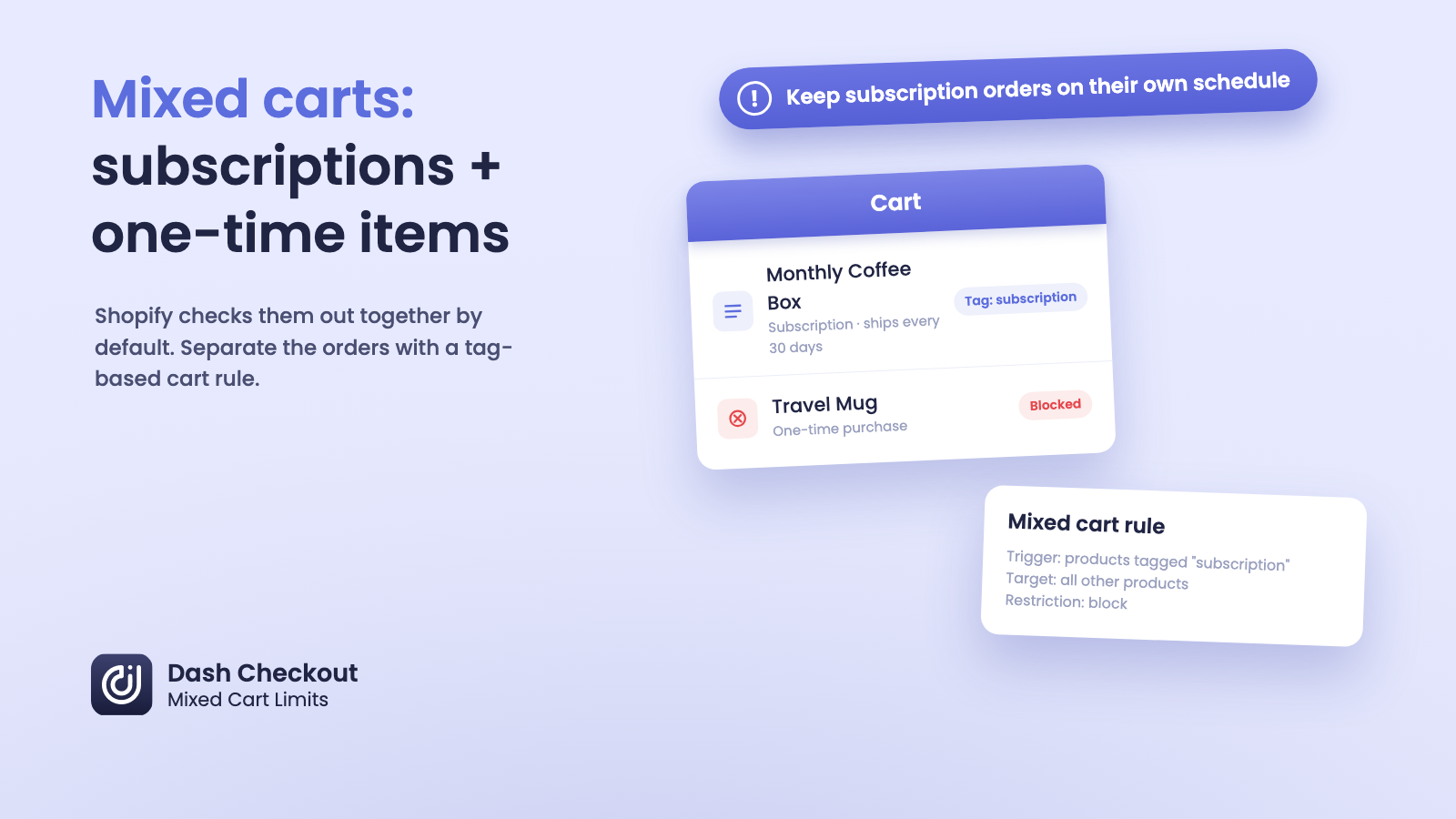
By default, Shopify checks out subscription items and one-time items together in the same order. If a customer adds a monthly coffee subscription and a one-time travel mug to their cart, both line items go through checkout as one purchase, with one shipping charge today. The subscription then bills and ships again on its own schedule going forward, but the first order is combined.
Shopify has no native setting that splits these into separate orders at checkout. Keeping subscription and one-time items apart takes a cart validation rule, which in practice means an app.
A granola brand running a “subscribe and save” program next to one-time bags runs into this constantly. A customer adds a monthly subscription bag and a one-off bag of a seasonal flavor to the same cart, and checkout lets the order through as normal. Nothing breaks. But the merchant now has one order carrying two different fulfillment rhythms glued together, and over enough orders, that mismatch turns into real operational drag.
About this guide: Dash Checkout builds checkout validation tools for Shopify, including the mixed cart limits mentioned below.
Why does Shopify combine subscription and one-time items into one order?
Shopify’s cart and checkout don’t treat a subscription line item as a different type of thing that needs separate handling. A selling plan (the mechanism behind subscriptions) changes how a line item bills and recurs after the first purchase, but it doesn’t change how that line item moves through checkout the first time. Everything in the cart checks out together, gets one order number, and ships under one shipping charge for that first transaction.
This works fine for a lot of stores. If your subscription items and one-time items ship on the same kind of schedule anyway, mixing them causes no problems. The issue shows up when a subscription item ships on its own recurring cycle, but a one-time item in the same cart is ready to go out today.
What problems does mixing subscription and one-time items actually cause?
A few patterns come up repeatedly with merchants running both purchase types:
- Fulfillment timing gets tangled. If a subscription item is tied to a recurring pack date and a one-time item is ready to ship today, combining them into one order forces a choice: hold the one-time item until the subscription’s next cycle, or split the shipment and absorb a second shipping cost.
- Inventory and production planning get confused. Subscription items are sometimes produced or packed in batches ahead of a recurring ship date. A one-time item riding along in the same order doesn’t fit that batch process.
- Billing expectations get muddy for the customer. A customer who only meant to try one bag, one box, or one kit can end up unsure whether they just started a recurring charge, especially if the subscription and one-time versions of a product look similar on the product page.
Stores that hit these problems need a rule that keeps the two apart.
Can you block subscription and one-time items from being purchased together on Shopify?
Yes, but not with a native Shopify setting. Shopify’s own admin has no toggle for “don’t let subscription and one-time products checkout together.”
What it does have is a Cart and Checkout Validation Function API. Apps can use it to inspect a cart and block checkout when a cart breaks a rule you define. Public App Store apps have been able to deploy these functions on every Shopify plan since January 2024, not just Shopify Plus. We cover that distinction in more detail in our guide to checkout validation without Plus.
The catch for subscription-specific rules is what that validation function can actually see. It reads whatever fields its query asks for, and nothing else. If the query never asks for a line item’s selling plan, the rule has no way to know that item is a subscription instead of a one-time purchase, no matter how the rule logic is written.
Why can’t checkout rules tell a subscription item apart from a one-time item automatically?
We checked the input query our own mixed cart validation function sends to Shopify. It asks for line item quantity, cost, product tags, and product and variant IDs. It does not ask for the selling plan on a line item, which is the field that would say “this specific line is a subscription.” Shopify’s checkout schema has that field available. Our function just isn’t built to read it today.
In practice, that means our mixed cart rule can’t automatically say “block this cart because one of these items is on a subscription.” The rule has to be told which products are subscriptions some other way, because it can’t infer purchase mode from the cart on its own.
How do you keep subscription and one-time items in separate orders today?
The workaround is the same pattern used for separating pre-order items from in-stock items, which we walk through step by step in how to keep pre-order and in-stock items in separate Shopify orders. Since a validation rule can’t see “subscription” directly, give it something it can see: a product tag.
- Add a consistent tag, something like
subscription, to every product that’s sold as a subscription. If you manage subscriptions through a subscription app, check whether it already tags these products for you before adding tags by hand. - In DC Order Limits, open Order Limits, then Mixed Cart Limits.
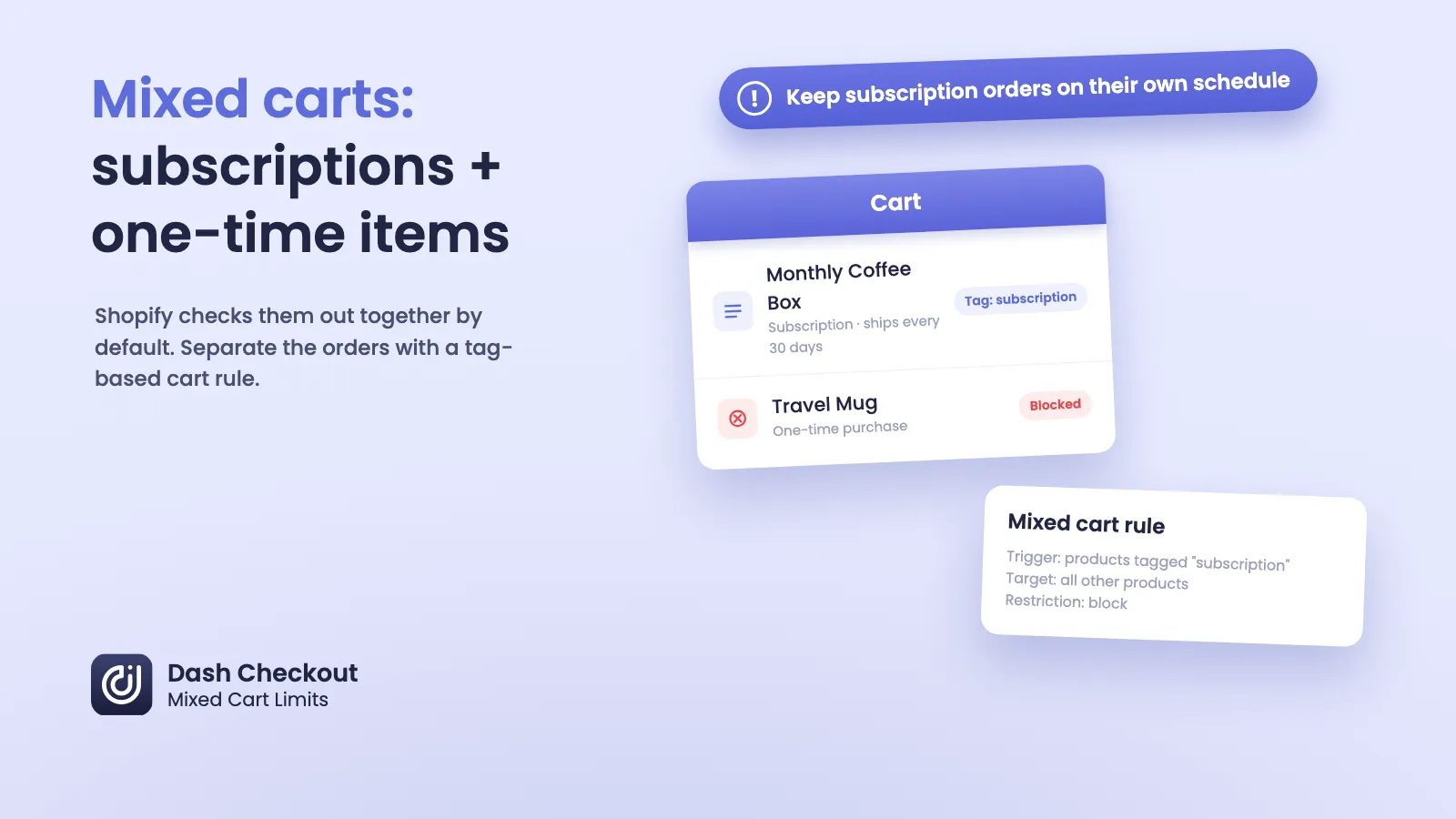
- Under Trigger products, choose “Products with specific tags” and enter your subscription tag.
- Under Target products, choose “All products.”
- Under Restriction type, choose “Block target products.”
- Save the rule.
Trigger products are automatically excluded from the target list. A cart with only subscription items checks out fine. A cart with only one-time items never activates the rule. Only a mix of the two gets stopped, with a customizable error message explaining why.
One limit worth knowing before you set this up: a tag applies to the whole product, not to the specific purchase option a customer picks at checkout. If a single product page offers both a one-time option and a “subscribe and save” option, tagging that product subscription catches it either way, since the rule can’t see which option the customer actually chose. For that setup, the rule can end up blocking a one-time purchase of a tagged product, or letting two tagged products through together even though only one was bought as a subscription.
The clean fix is the same one used for pre-order separation: sell the subscription version as its own product, with its own tag, separate from the one-time version of that product.
Does this work for limiting subscription carts, not just blocking them?
The trigger-and-target system behind mixed cart limits isn’t only block-or-allow. It also supports requiring certain products together. You could set up the reverse of the block rule above, requiring a subscription product before certain add-ons get added, if your use case runs the other direction.
What it doesn’t do natively is apply a rule like a minimum order value only to subscription lines. That still runs into the same problem described above: the rule can’t see which lines are subscriptions on its own. If you need a rule that treats subscription line items differently without blocking the mix outright, tagging is still the way to make that possible today.
Does this require Shopify Plus?
No. Checkout validation itself, the mechanism that lets an app block checkout based on cart rules, is available through apps on any Shopify plan since January 2024. What requires Shopify Plus is writing and deploying your own custom Shopify Function instead of installing an app. Placement-specific payment hiding and custom payment terms also stay Plus-only. Mixed cart limits are part of DC Order Limits’ Pro plan, which is a separate thing from your Shopify plan tier.
Frequently asked questions
Does Shopify automatically split subscription and one-time items into separate orders?
No. Shopify checks out everything in a cart as one order by default, regardless of whether individual line items are subscriptions or one-time purchases. The first charge is combined into one order, though the merchant can still fulfill it as separate shipments if needed. Subsequent subscription charges and shipments happen separately on their own recurring schedule.
Can an app block subscription items from being purchased with one-time items?
Yes, using Shopify’s Cart and Checkout Validation Function API, which public apps can deploy on any plan. Our rule has to be based on something our validation function can see, like a product tag, since our function doesn’t request the selling plan field in its query.
What if a single product offers both a one-time option and a subscription option?
Tagging that product catches it under either purchase mode, since the rule reads the tag on the product, not the purchase option a customer picked in their cart. If you need the rule to behave differently for the one-time version versus the subscription version of the same product, sell them as two separate products, each with its own tag.
Why can’t a cart validation rule just detect subscriptions automatically?
Because the rule only sees the fields its underlying query requests. Our cart validation function asks for things like product tags, IDs, and cart totals, not the selling plan attached to a line item. Without that field in the query, there’s no way to tell a subscription line apart from a one-time one without another signal, like a tag.
What’s the workaround if I want subscription orders to stay separate?
Tag every subscription product consistently, then set up a mixed cart rule with that tag as the trigger, all other products as the target, and a block restriction. This is the same trigger-and-target pattern used to separate pre-order items from in-stock items.
Do I need Shopify Plus to set this up?
No. Checkout validation through apps works on any Shopify plan since January 2024. Shopify Plus is only required for custom-built Functions you write and deploy yourself, or for placement-specific payment hiding and custom payment terms.
Does this affect how subscription billing works after the first order?
No. Separating subscription and one-time items at checkout only changes which products can ship in the same first order. It doesn’t change how the subscription itself bills or recurs afterward, since that’s handled by your subscription app or Shopify’s native subscription setup, not by the cart rule.
Start with one tag and one rule
If subscription and one-time items are landing in the same cart and causing fulfillment or billing confusion, the fix doesn’t require custom development. Tag your subscription products consistently, then build one mixed cart rule off that tag.
DC Order Limits includes mixed cart limits on the Pro plan, using the same trigger-and-target system covered in this guide. Learn more on our mixed cart limits page, or read the full walkthrough for the closely related pre-order case in how to keep pre-order and in-stock items in separate Shopify orders.
If your subscription app tags products differently than expected, write to us through the app. We read every message and can help you match the rule to your actual setup.