
Bulk Ready for Pickup
Mark hundreds of orders ready for pickup in seconds
Stop clicking through orders one by one. Select multiple orders, hit one button, and every customer gets notified automatically. Built for high-volume stores that handle POS and in-store pickup orders.
Features
Why use Bulk Ready for Pickup?
Save hours of manual work by marking multiple orders ready at once. Perfect for stores processing dozens or hundreds of pickup orders daily.
One Click, All Orders Notified
Select your orders, click once, and Shopify automatically sends pickup notifications to every customer.
Massive Time Savings
What used to take 30 minutes now takes 30 seconds. Process hundreds of orders in the time it took to do ten.
Native Shopify Integration
Works directly in your Shopify admin. No external tools or complicated workflows required.
Automatic Customer Notifications
Customers receive standard Shopify pickup notifications via email. No extra setup needed.
Built for High Volume
Designed for stores processing large numbers of pickup orders. Handle rush periods without breaking a sweat.
Works with POS Orders
Perfect for orders placed online for in-store pickup or created directly through Shopify POS.
How It Works
Three steps to notify all your customers
Simple Workflow
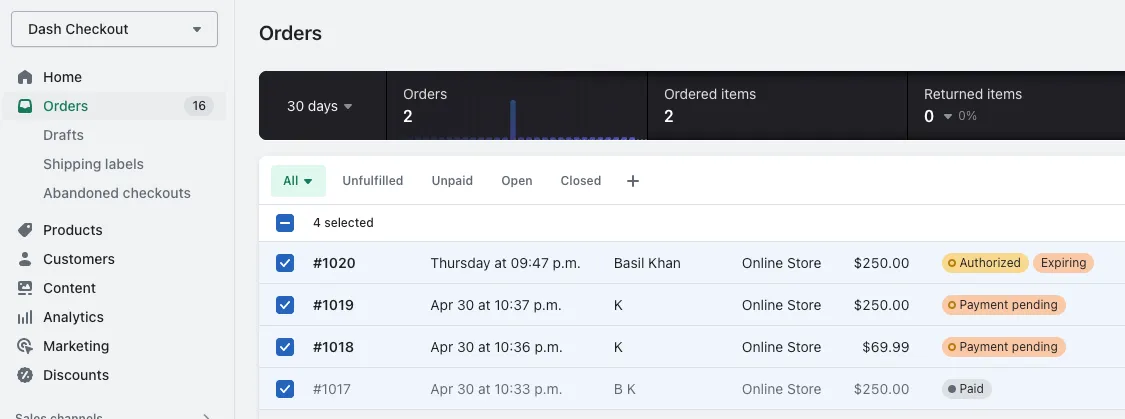
No complicated setup. Just select, click, and your customers are notified.Select your orders
In Shopify admin, use the checkboxes to select all the orders you want to mark as ready for pickup.
Open bulk actions
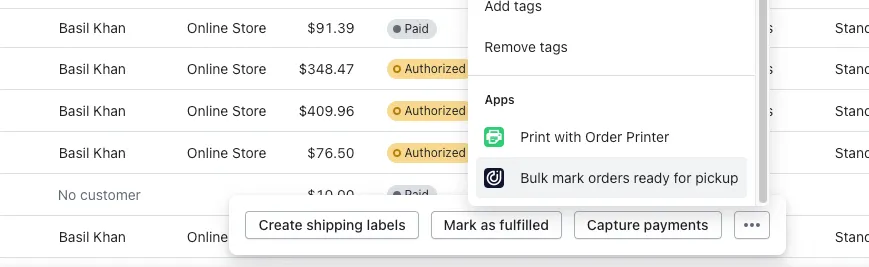
Click the three-dot menu (or "More actions") to reveal the bulk action options.
Mark ready for pickup
Select "Bulk marking orders ready for pickup" and all selected orders are updated instantly.
Step-by-step guide
Get started in under a minute
Step 1: Go to Orders
Navigate to the Orders section in your Shopify admin.
Step 2: Select orders
Use the checkboxes to select all the orders you want to mark as ready. You can select as many as you need.
Step 3: Click Bulk Actions
Click the three-dot menu or "More actions" button to reveal the bulk action options.
Step 4: Mark ready for pickup
Select "Bulk marking orders ready for pickup" from the menu. All selected orders are updated and customers are notified automatically.
Use Cases
Perfect for these use cases
Any business handling multiple pickup orders will benefit
Buy Online, Pick Up In Store workflows become effortless when you can batch-process orders.
Prepare multiple orders and notify all customers at once when their food is ready.
Process large batches of prepared orders efficiently during peak hours.
Mark multiple arrangements ready for pickup, especially during holidays and events.
Batch notify customers when their pre-orders or custom items are ready.
If you process more than a few pickup orders per day, this feature will save you time.
Benefits
Why merchants love this feature
No more opening each order individually to mark it ready. Select all and done.
When you process orders in bulk, you are less likely to miss one or notify the wrong customer.
Black Friday, holiday rushes, or busy weekends - process all your pickup orders in seconds.
Your team spends less time on admin work and more time helping customers.
Ready to save hours on pickup notifications?
Install Dash Checkout free and start bulk-processing orders today.