Customer Purchase Limits
Every customer has a quota. You decide what it is.
Track lifetime purchases per customer and enforce the limits that matter to your business. Daily quotas for fresh goods, VIP tiers for loyal members, employee allowances with caps, annual limits on exclusives. You set a rule once and checkout enforces it on every order.
Features
Limits that actually work
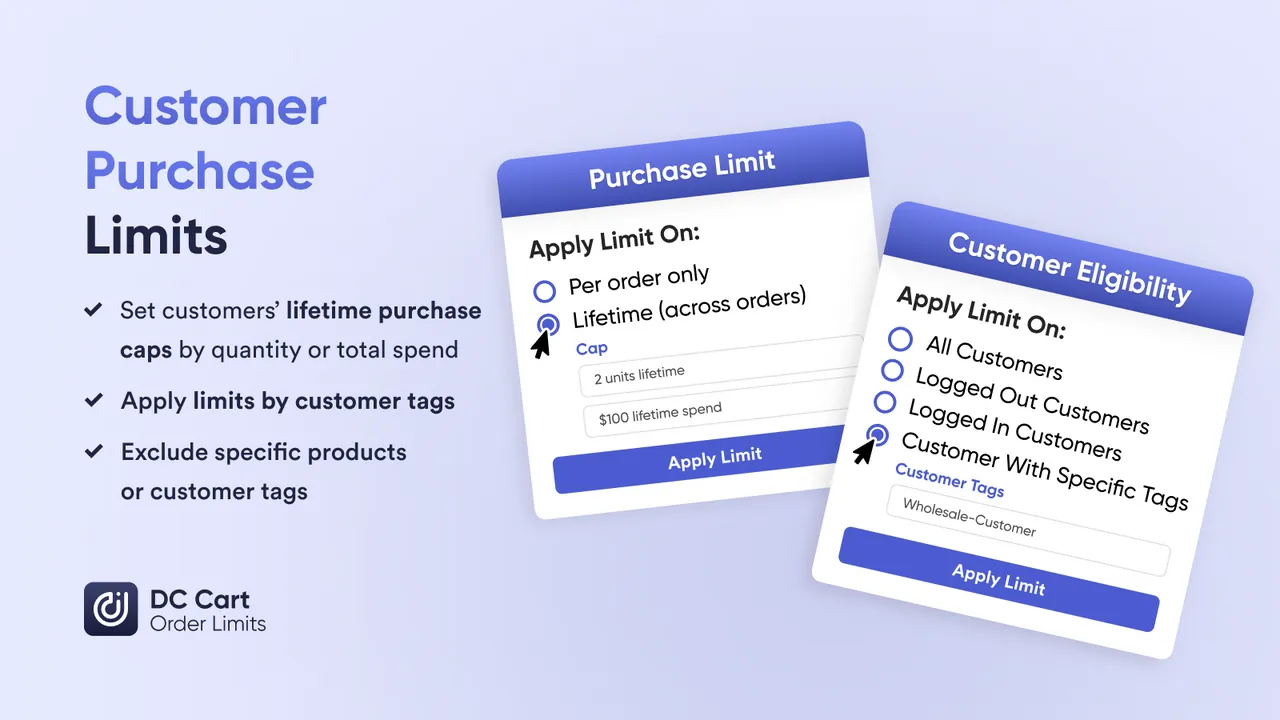
Most purchase limit apps only track the current cart. We track every order a customer has ever placed, so limits still apply when a customer comes back later or shops on another device.
Lifetime Purchase Tracking
Every order counts toward the limit, forever. A customer who bought 2 last month cannot buy 2 more today unless you reset their quota.
Quantity or Spend Caps
Limit by units ("max 3 croissants per day") or by dollar amount ("max $200/year on employee discount"). Use whichever fits your business.
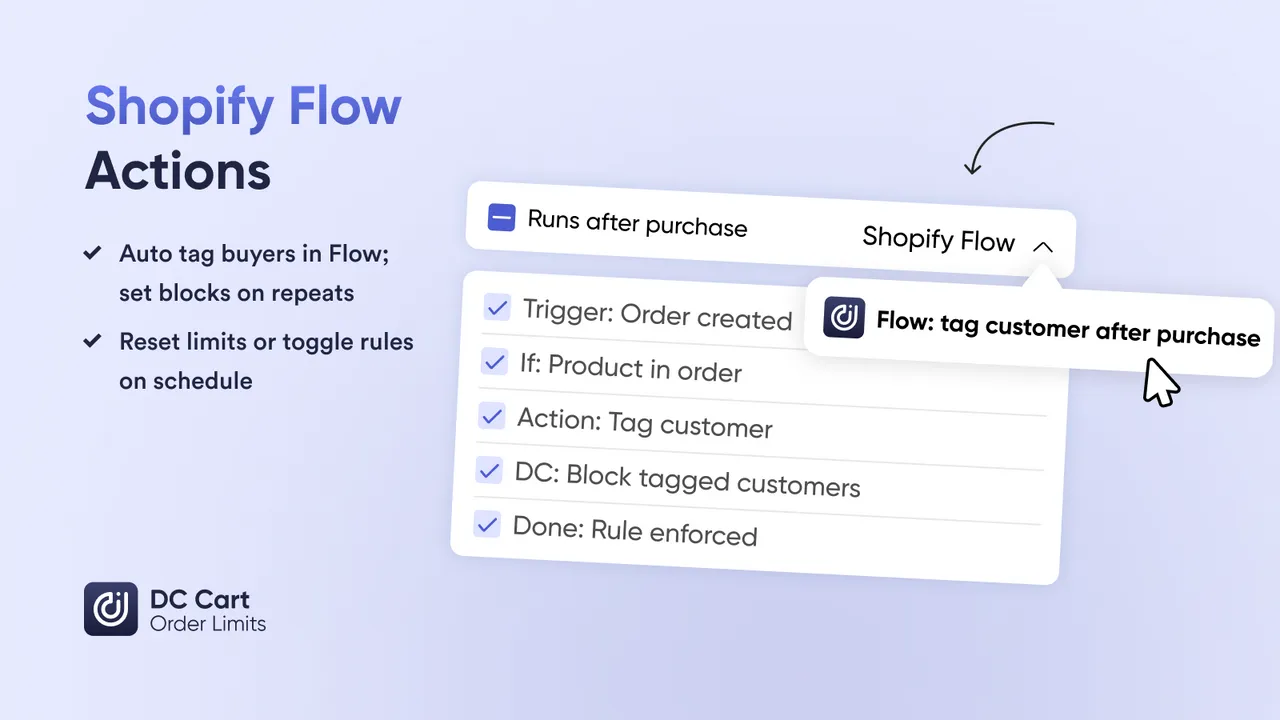
Automatic Resets via Flow
Reset limits daily, weekly, monthly, or yearly with Shopify Flow. Turn lifetime tracking into recurring quotas without writing code.
Per-Product or Per-Group Limits
Limit each SKU independently, or group products together. "1 pair per colorway" or "3 total from this collection" - your choice.
Customer Tag Targeting
Different limits for different customers. Gold members get 5, Silver gets 3, employees get 2 at 40% off. Tag-based rules make it automatic.
Login Required Option
Force customers to log in before purchasing limited products. Essential for tracking purchases and preventing account workarounds.
How It Works
Configure once, enforce automatically
No Manual Checking Required
Limits are enforced at checkout on every order, so you don't have to review orders by hand.Create a limit rule
Select products, set the cap (quantity or spend), choose your time window. Example: "Max 6 croissants per customer per day" or "Max 2 limited editions per customer per year".
Target by customer tag
Apply to everyone, or segment by tag. For example, VIP members can get higher limits, employees capped discount access, and wholesale accounts allocation tiers.
Checkout blocks exceeded limits
When a customer tries to buy more than allowed, checkout blocks the order with a clear message explaining their remaining quota.
Live in under 5 minutes
Works without code, theme changes, or a developer
Step 1: Create a limit rule
Name your rule (e.g., "Daily Croissant Limit", "Employee Discount Cap", "VIP Annual Allowance") and select the products it applies to.
Step 2: Set your caps
Choose quantity limits ("max 2 per customer"), spend limits ("max $500 per year"), or both. Set whether limits apply per-product or across a group.
Step 3: Target customer segments
Apply to all customers, or target by tag. Create tiered access: employees get one limit, VIPs get another, everyone else gets the default.
Step 4: Activate and monitor
Turn on the rule. Monitor usage in your dashboard. Reset all limits manually or schedule resets via Shopify Flow.
Use Cases
Real use cases from real merchants
These are the actual scenarios our merchants use purchase limits for every day
Daily limits on popular items (max 6 croissants per customer). Pre-order caps for special occasion cakes (1 custom cake per order). Prevent one customer from buying out your morning batch.
Gold members get access to 5 limited items per drop, Silver gets 3, everyone else gets 1. Reward loyal customers with higher allocations while keeping drops fair.
Staff discounts capped at $500/month to prevent abuse. Tag employees, set their discount limit, and let Shopify Flow reset quotas monthly.
"2 limited editions per customer per year." Membership perks with yearly caps. Gift card allowances that reset each January. Long-term limits for premium products.
Fair access at pop-up shops and product drops (max 2 per person). Launch events with enforced limits. Prevent one eager customer from buying your entire booth inventory.
1 pair per colorway, strictly enforced. Track purchases across the entire collection. Resellers cannot game the system when every order is logged to their account.
One box per month, plus max 3 add-on items. Prevent subscribers from over-ordering limited add-ons that should be shared across the subscriber base.
Tiered allocation by customer tag. New retailers: 50 units/month. Established partners: 200 units/month. Key accounts: custom allocation. Manage channel inventory automatically.
Company accounts with annual gifting budgets. Tag corporate customers, set their yearly spend cap, and let them order throughout the year until they hit the limit.
Benefits
What changes when you have real limits
When customers know limits are enforced, they stop rushing and stressing. They trust that they will get their fair share if they show up.
Staff perks are great until someone buys $5,000 of product at 40% off. Capped allowances let you be generous without being reckless.
When one customer cannot buy all 12 croissants, 12 customers get to buy one. Better distribution means happier customers overall.
Shopify Flow resets limits daily, weekly, monthly, or yearly on your schedule, so there are no spreadsheets to maintain and no resets to remember.
Shopify Flow Integration
Quotas that reset themselves
Lifetime Tracking + Scheduled Resets = Recurring Quotas
DC Order Limits tracks every purchase, and Shopify Flow clears the slate on your schedule. Combined, you get quotas that reset on whatever cycle your business uses.Daily resets for fresh goods
Bakeries reset limits at 5am every day. Customers can buy their 6 croissants again tomorrow, and nobody has to reset anything by hand.
Monthly resets for employee programs
Staff discount allowances reset on the 1st of each month. Employees get their full $500 quota back automatically. HR never has to touch it.
Yearly resets for premium allocations
"2 limited editions per year" resets every January 1st. VIP members know exactly when their annual allocation refreshes.
Instant manual resets when needed
New product launch? Reset all limits instantly via Flow or the dashboard. Start fresh whenever your business needs it.
Reviews
What merchants say
" We run limited sneaker drops and needed a way to enforce one pair per customer across all orders. This app tracks purchase history so resellers cannot game the system. Our drops last longer and more real fans get pairs. "
Jordan
Sneaker Store Owner
" Our bakery was losing money because one customer would buy all the croissants at 6am. Now we limit to 6 per customer per day and more people get fresh pastries. The daily reset via Shopify Flow works perfectly. "
Marie
Bakery Owner
" Employee discount abuse was a real problem. Staff were buying thousands at 40% off and reselling. Now we cap at $500/month per employee. HR is happy, finance is happy, and staff still get a fair benefit. "
David
Retail Operations Manager
FAQs
Frequently Asked Questions
How is this different from Shopify's built-in cart limits?
Shopify's native limits only apply to the current cart. If a customer completes checkout and comes back, they can buy again. DC Order Limits tracks purchase history across all orders, so a customer who bought 2 last month cannot buy more unless you reset their quota.
Do customers need to be logged in?
Yes. Customer purchase limits require customers to log in so we can track their purchase history. You can require login for specific products or your entire store. Guest checkout can still be allowed for non-limited products.
Can I set different limits for different customer groups?
Yes. You can use Shopify customer tags to create tiered limits. For example, VIP members get 5 units, regular members get 2, and everyone else gets 1. The app checks customer tags at checkout and applies the appropriate limit.
How do I reset limits for a new product drop?
You can reset limits manually from the dashboard with one click, or automate resets using Shopify Flow. Common schedules include daily resets for fresh goods, monthly resets for employee discounts, and yearly resets for premium allocations.
What happens when a customer reaches their limit?
Checkout is blocked and the customer sees a clear message explaining their remaining quota. You can customize this message to fit your brand voice and provide helpful next steps.
Can I limit by spend amount instead of quantity?
Yes. You can set spend caps like "$500 maximum per customer per month" for employee discount programs or corporate accounts. This works independently or alongside quantity limits.
Learn More
Related guides and tutorials
Step-by-step guide to configuring lifetime purchase limits that track customer buying history.
The definitive guide to one-per-customer limits for limited drops and exclusive releases.
Set MOQ requirements for wholesale accounts with different minimums for different customer tiers.
Set up your first limit in 5 minutes
Whether you are capping employee discounts, managing bakery inventory, or running fair sneaker drops, customer purchase limits give you control over who buys what. Install free and configure your first rule today.