· Dash Checkout · back-in-stock · 10 min read
Restock alert minimum quantity on Shopify: stop false alerts
A single returned unit can email your entire waitlist. How minimum quantity thresholds and level-triggered stock checks stop false restock alerts on Shopify.
A customer cancels an order. Shopify’s refund flow silently restocks that one returned unit. Inventory ticks from 0 to 1. Your back in stock app emails the entire waitlist.
The fastest shopper buys the item. Everyone else lands on a sold-out page within minutes.
Merchants have raised the underlying problem directly on Shopify’s own community forum: mass-notifying an entire waitlist the moment inventory ticks up, even by a single unit, sends everyone racing for stock that can’t cover them. One merchant described the result as people “rushing to buy at the same time for available items” with no way to control who gets notified first, a symptom of alerts firing on any restock rather than a real one.
Two things fix this: a minimum quantity threshold on the alert, and an app that re-checks actual stock levels on a schedule instead of reacting only to the moment inventory crossed zero. This guide explains both.
About this guide: Dash Checkout makes a Shopify checkout and back in stock app. This guide covers how Shopify’s native behavior causes false alerts, and what to look for in any third-party app, including options besides Dash.
How one refund turns into 300 emails
Shopify’s refund and cancel flows include a “Restock item” checkbox that is ticked by default. A routine return, the kind that happens dozens of times a day at any active store, moves inventory from 0 to 1 with no signal that you intended to relaunch the product.
The Shopify Community has a thread called “Please please please disable default restock item” that has accumulated 20+ replies since 2021 and has never been resolved. Merchants there describe the same result: the auto-restock blasts “items in stock” notifications to hundreds of subscribers.
The damage sequence looks like this: 1 unit comes back in stock, 300 people get emailed, 1 shopper wins, and 299 people click through to a product that is already sold out. The next real restock email from your store gets treated with suspicion. Some subscribers unsubscribe. A few mark it as spam.
A second version of this problem is harder to see. Merchants running Klaviyo for restock alerts have reported that a momentary restock alone is enough to clear an entire waitlist queue. A brief inventory blip, maybe a cancelled pre-order, burns through the whole list of waiting subscribers. Those subscribers get marked as notified. When the real restock arrives, they never hear about it.
Why edge-triggered alerts misfire
To understand why this keeps happening, it helps to know the difference between two ways an app can watch inventory.
An edge-triggered system reacts the instant a value crosses a line. A level-triggered system keeps checking the actual value and acts on the ongoing state. Most restock alert apps are built on the edge.
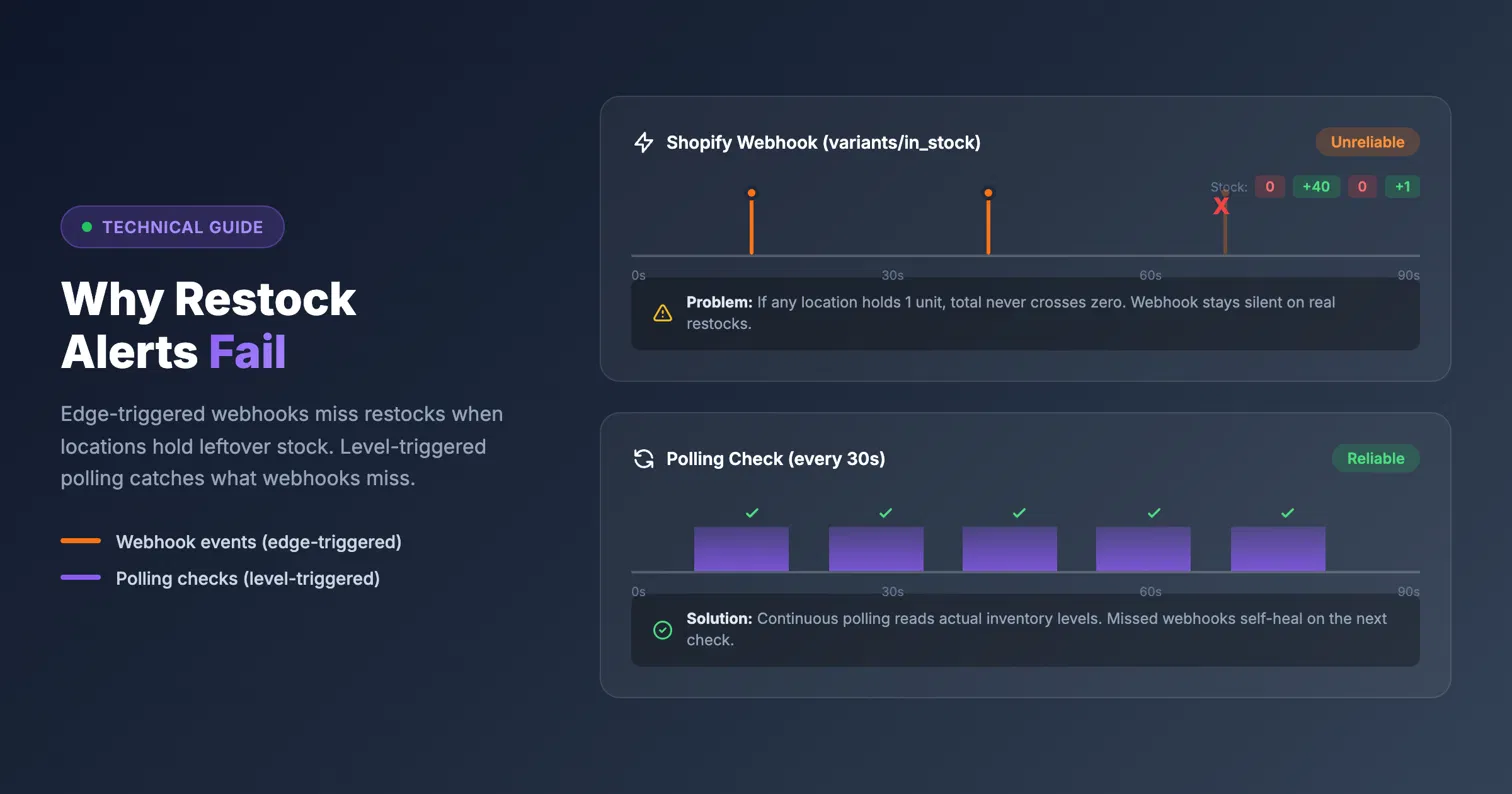
The underlying Shopify mechanism is the variants/in_stock webhook. This fires when a variant’s total inventory, summed across every location, crosses from zero to positive. The payload contains no per-location data, and more importantly, it contains no quantity information. A 0-to-1 return looks identical to a 0-to-500 pallet delivery. The webhook cannot tell the difference.
A Shopify Community thread on webhook reliability documents another problem: the variants/in_stock webhook only fires when every location has first hit zero, and developers report it not arriving at all in some cases. So webhook-only apps both over-fire on trivial restocks and under-fire when Shopify misses delivering the event.
A Swym Back in Stock Alerts review describes the app “randomly started sending out hundreds of back in stock alerts for products that were still out of stock.” An Appikon review says it “misfires for us all the time.” Both are real merchants describing the same class of problem: detection architecture that trusts a single event rather than checking what the inventory actually says.
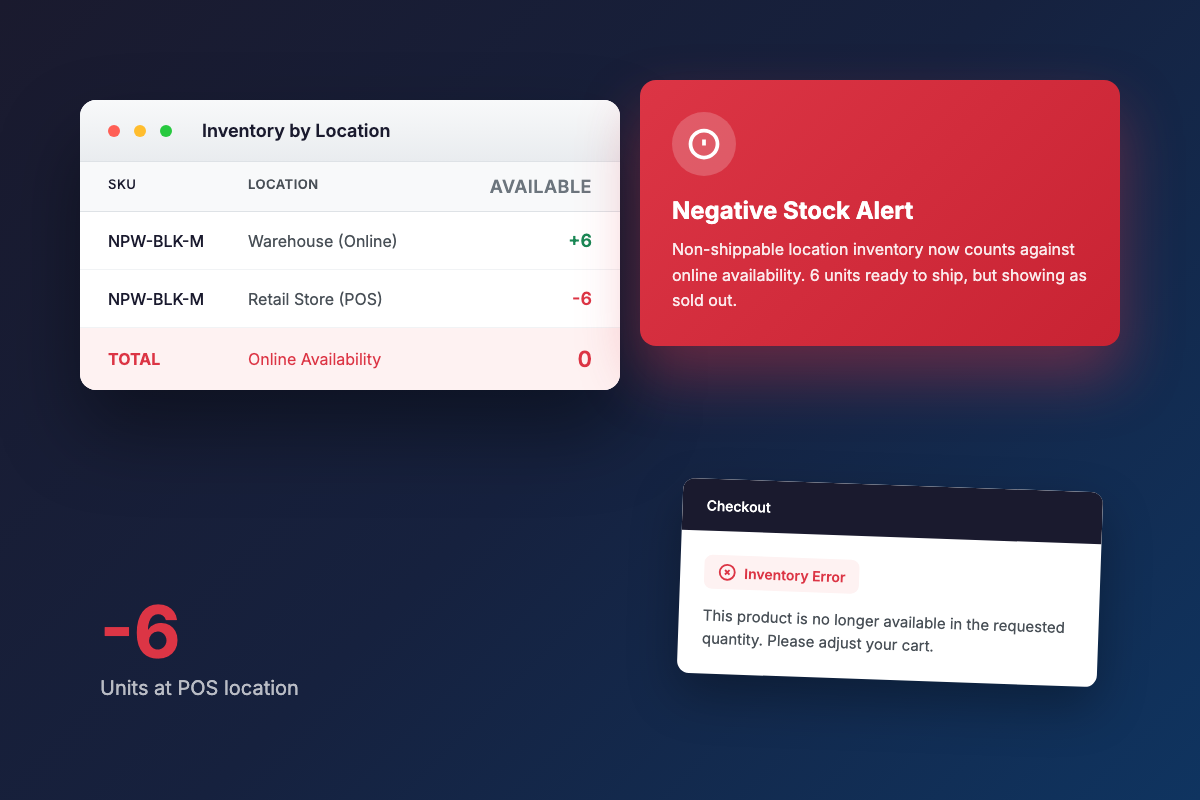
The July 2026 change that r/shopify thread 1uvg2ij describes adds another wrinkle. Shopify now counts negative stock at non-shippable locations into online availability, so a single oversold POS location can cancel out real stock elsewhere. An August 2024 thread shows multi-location availability math breaking a “Notify me” plugin entirely. Any alert system that trusts the total from a single fired event inherits all of this.
Fix part 1: set a minimum quantity threshold
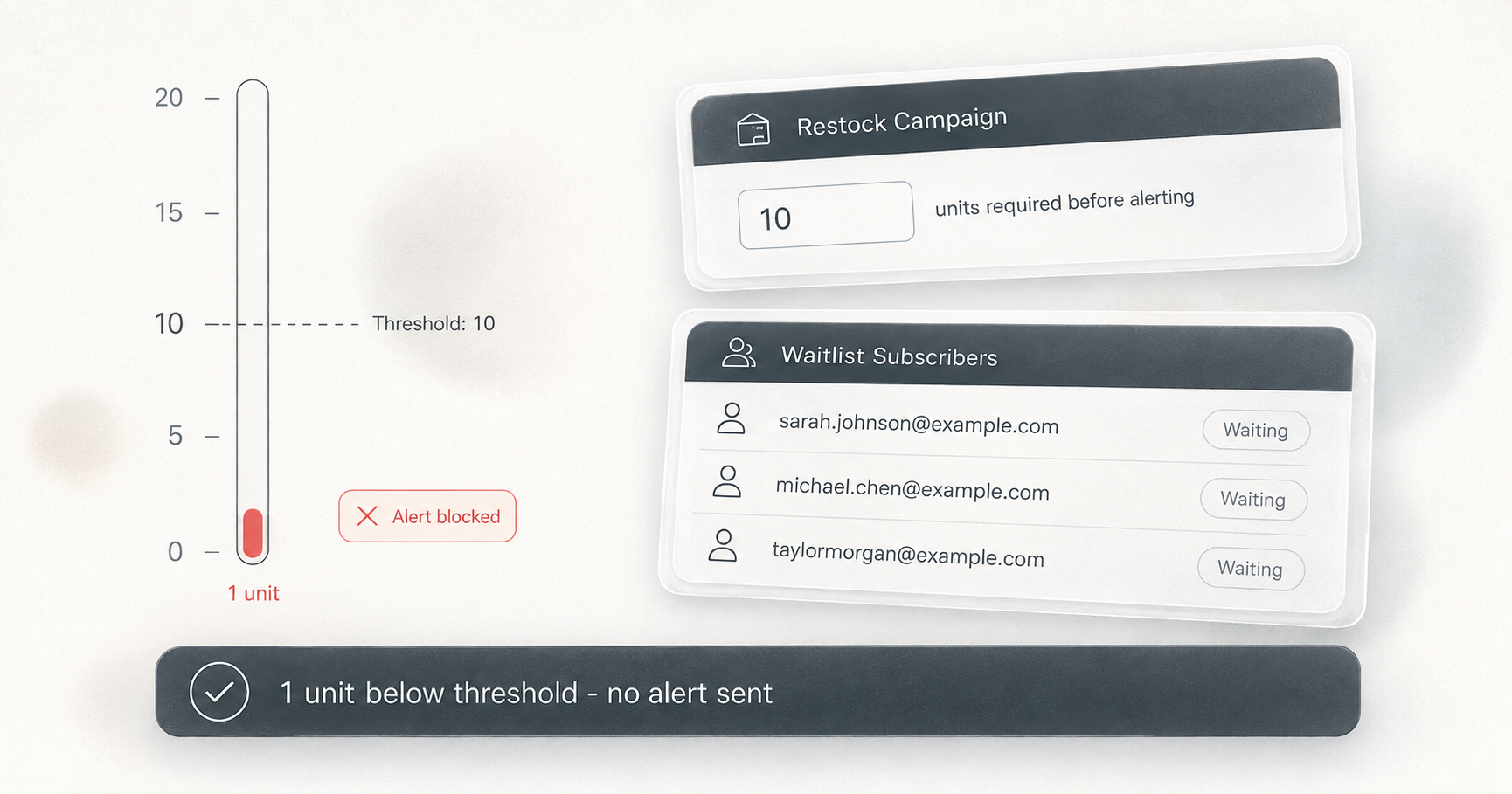
A notify threshold changes the trigger condition from “any positive number” to “at least N units.” Set it to 2 or higher, and a single returned unit cannot wake up your list. The blast requires real stock.
The practical question is how to size N. If 300 people are waiting, alerting on 1 unit guarantees 299 disappointments. A threshold of 10 or 20 means the email goes out only when there are enough units to give a meaningful portion of your waitlist a real shot at buying.
Klaviyo’s own staff point to thresholds as the standard workaround for its back in stock limitations in their community forum threads (thread 19261 and thread 2354). That is where industry consensus already sits on this problem.
A threshold is only as good as the moment it is evaluated, though. If an app checks quantity only when the zero-crossing webhook fires, a restock of 0 to 1 with a threshold of 3 is evaluated once, fails, and then nothing re-checks when stock later climbs to 3 through additional units arriving. Edge-only thresholds trade false alerts for missed alerts. You stop the blast for small restocks, but you also miss the real one when it comes in gradually.
Fix part 2: level-triggered stock checks
The complete fix is an app that keeps a watch on every variant with pending subscribers and re-checks actual inventory on a schedule, comparing the current level to each campaign’s threshold.
With that design, the threshold becomes enforceable at all times. A restock of 1 with a threshold of 3 sends nothing. When stock later reaches 3, the next check catches it and notifies. The alert fires when stock actually reaches the number, not only at the moment a webhook happened to arrive.
This also handles the failure modes that webhook-only systems miss. A webhook Shopify never delivered, a period of app downtime, or a restock that came in below the threshold all get corrected on the next poll. The app keeps checking until the condition is actually met.
A check that runs every 30 seconds raises an obvious worry about duplicate emails. Well-built apps prevent this by atomically marking each subscriber as notified before the email is even queued. The check and the notification happen as one operation, so a second poll cycle arriving seconds later sees the subscriber is already notified and does nothing.
Setting up a restock alert threshold in Dash Checkout
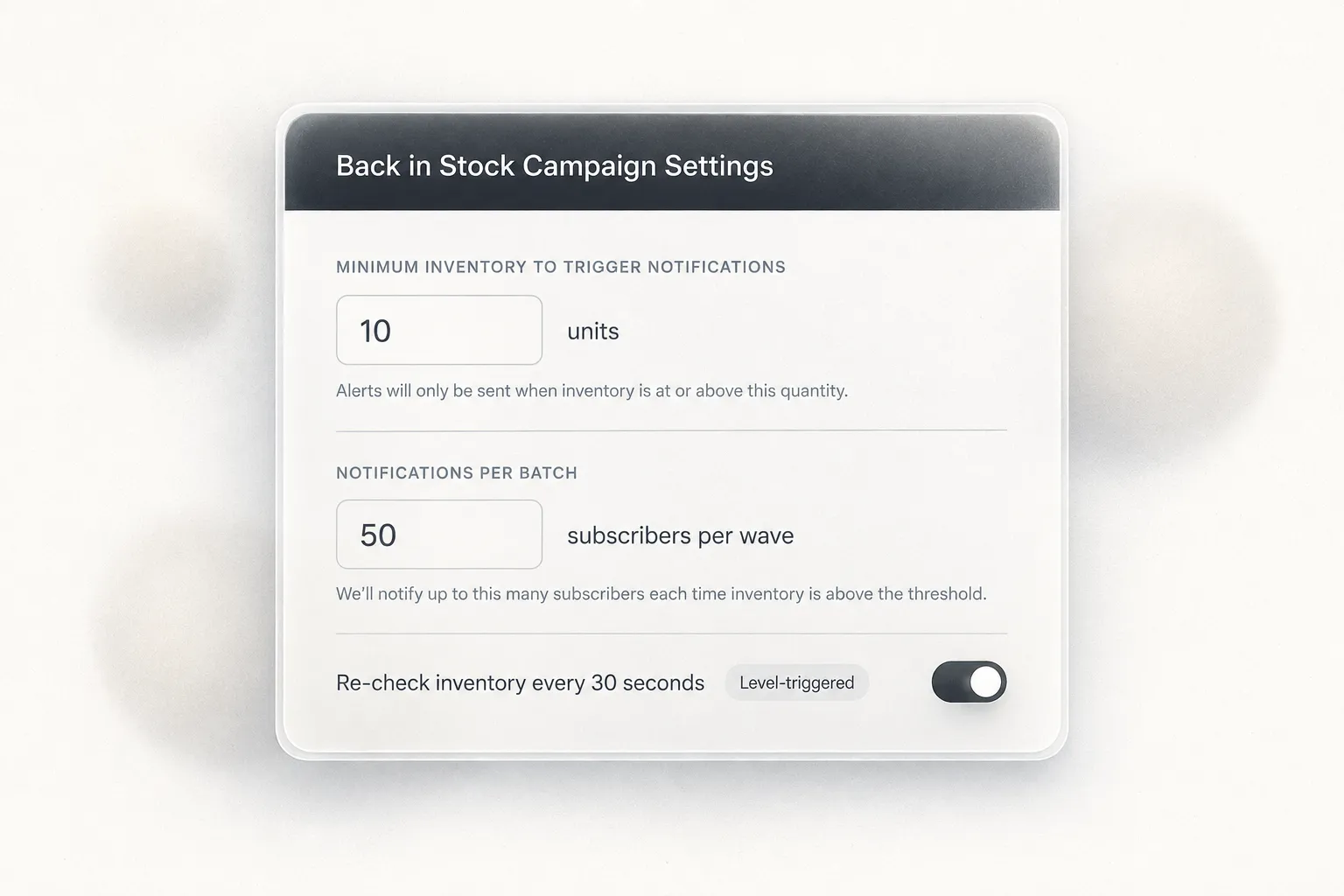
Dash Checkout’s Back in Stock feature (currently badged Beta in the app) combines both trigger paths. Shopify’s variants/in_stock webhook covers campaigns counting total inventory, firing the moment stock crosses zero. A scheduler tick runs every 30 seconds and re-checks live inventory for every variant with pending subscribers, comparing actual quantities against each campaign’s threshold. Both paths feed the same processing pipeline.
To set a threshold, go into your campaign form and find “Minimum inventory to trigger notifications.” The field accepts any number from 1 (the default) up. Setting it to 2 stops the single-unit return blast. Setting it closer to your typical restock size, say 10 or 20, means the email waits until a real restock arrives.
You can also tune batching to match available supply. “Notifications per batch” accepts 1 to 1,000 (the default is 100) and “Minutes between batches” delays the next wave. Follow-up batches always wait at least 1 minute even with the delay set to zero. A merchant restocking 50 units can email the first 50 subscribers immediately and space the rest out, instead of blasting the full list at stock that cannot cover it.
To verify what triggered an alert, the Activity tab logs an “Alert triggered” event for each qualifying campaign. It records the variant, product, the current quantity at the time, and the campaign’s threshold. These events are deduped to one entry per campaign and variant per hour, so you see one clear record rather than a log full of repeated entries.
On channels: email and browser push are the only notification options. Email alerts require the Pro plan. Signups are collected on any plan regardless, and after upgrading, a catch-up job automatically notifies waiting subscribers for variants that are still in stock at that moment. Browser push is included free on every plan, but the shopper must accept the browser’s permission prompt after signing up, so it counts as a separate opt-in. See the pricing page for plan details.
One caveat to be aware of: thresholds apply to tracked inventory only. Variants with untracked inventory always count as meeting every threshold because they are always purchasable.
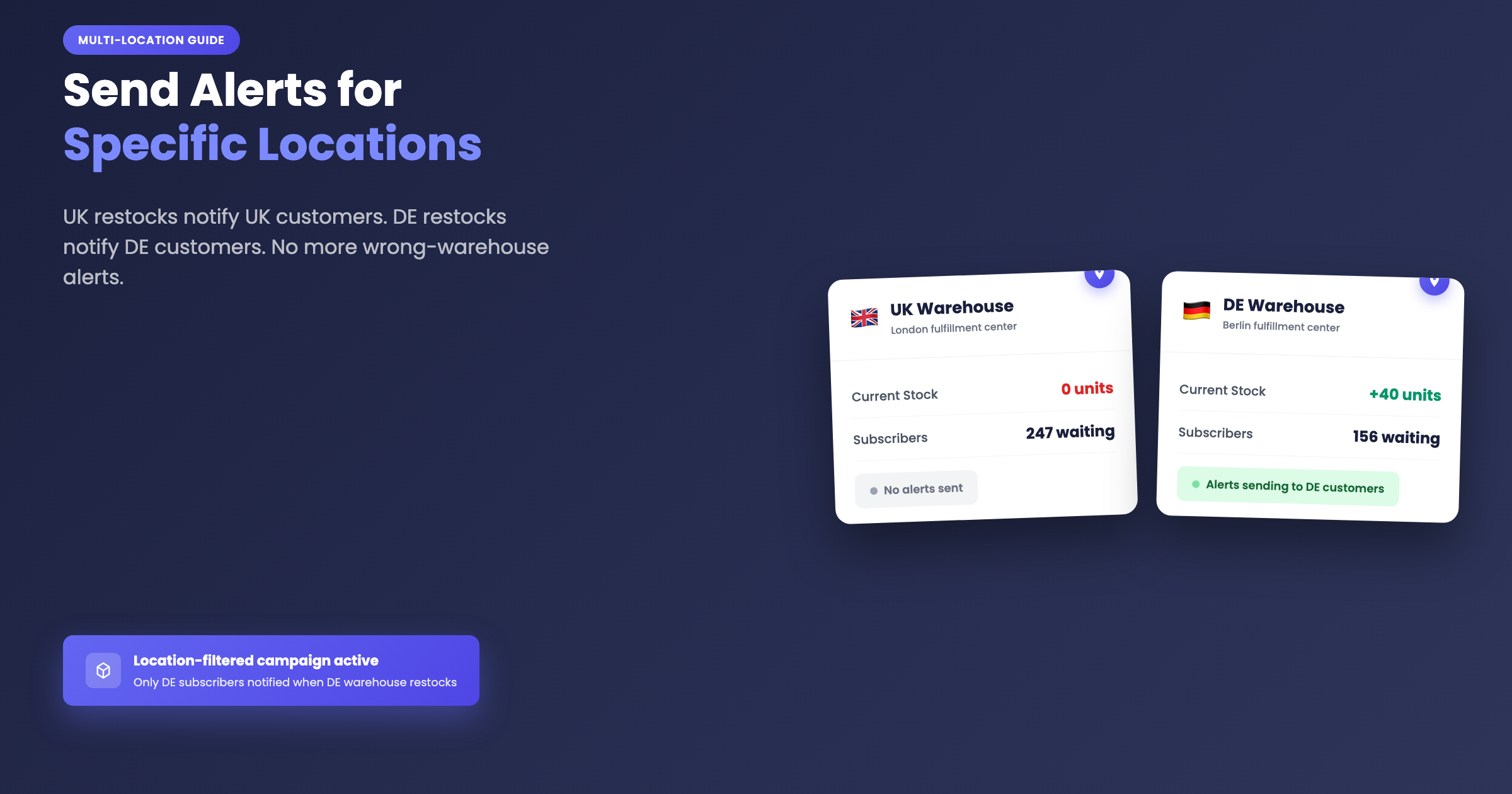
If your store uses multiple locations, campaigns can also count inventory at selected locations only. That setting pairs with thresholds for multi-warehouse stores. Location-filtered alerts are picked up by the 30-second poller rather than the instant webhook, so expect a latency of about 30 seconds, not instant delivery.
How other apps handle false restock alerts
Minimum quantity thresholds are not unique to Dash. Swym Back in Stock Alerts, Notify Me!, Kbite, STOQ, and Klaviyo all offer some version of a threshold. The differences show up in trigger architecture and what reviews say about reliability in practice.
Klaviyo’s staff confirm in their own community that the native back in stock flow “does not distinguish between inventory at different store locations,” a limitation that has been raised repeatedly for about five years. The in-thread complaint from the June 2024 r/shopify thread about momentary restocks shows exactly what happens when edge-only triggering meets Klaviyo’s architecture: inventory blips fire the flow, the waitlist queue is spent, and subscribers never hear about the real restock. The staff-recommended workaround is thresholds or building a custom API integration.
Appikon exposes a quantity_required API parameter but no location triggers appear in their documentation, and reviews report it “misfires for us all the time.”
Swym has both thresholds and location control, but location control sits on its Premium plan at $99.99/mo. Reviews document phantom alert storms from Swym, with one merchant describing how it “randomly started sending out hundreds of back in stock alerts for products that were still out of stock.” Others report hours-long inventory sync lag between Shopify and Swym.
Notify Me! automatically filters to online-fulfillable locations per its own help documentation, and merchants cannot choose which locations count. STOQ has thresholds and location selection, but the location choice applies globally across all products rather than per-campaign.
Before committing to any vendor, ask their support team two questions: is detection edge-triggered only, or does the app also re-check actual stock levels on a schedule? And what happens when a refund restocks one unit? No app we reviewed publicly documents what happens when a location goes negative, which is increasingly relevant after the July 2026 Shopify inventory change.
One returned unit should never cost you 300 subscribers
The app that “won’t message 300 people when 1 unit comes back in stock when I cancel an order” exists. The mechanics are a minimum quantity threshold set above 1, combined with level-triggered re-checking that keeps evaluating stock until it actually reaches that number. A single return sits below the threshold and no one gets emailed. The next time a real pallet arrives, the check catches it and notifies.
Dash Checkout’s Back in Stock feature ships both. Signups are collected on every plan, email alerts go out on the Pro plan, and browser push is included free. You can install Dash Checkout from the Shopify App Store and set a threshold in a few minutes. For multi-location stores or stores hit by the seasonal overselling patterns that come with POS, the inventory protection guide covers how to keep stock counts clean before a restock. And if a product is gone long enough that preorders make more sense than a waitlist, the preorder setup guide covers that path.