· Dash Checkout · back-in-stock · 10 min read
Negative stock is breaking Shopify availability: July 2026 change
Since July 2026, negative stock at a non-shippable Shopify location counts against online availability. Shoppers can add to cart, then hit a checkout error. Here is the inventory math and how to fix it.
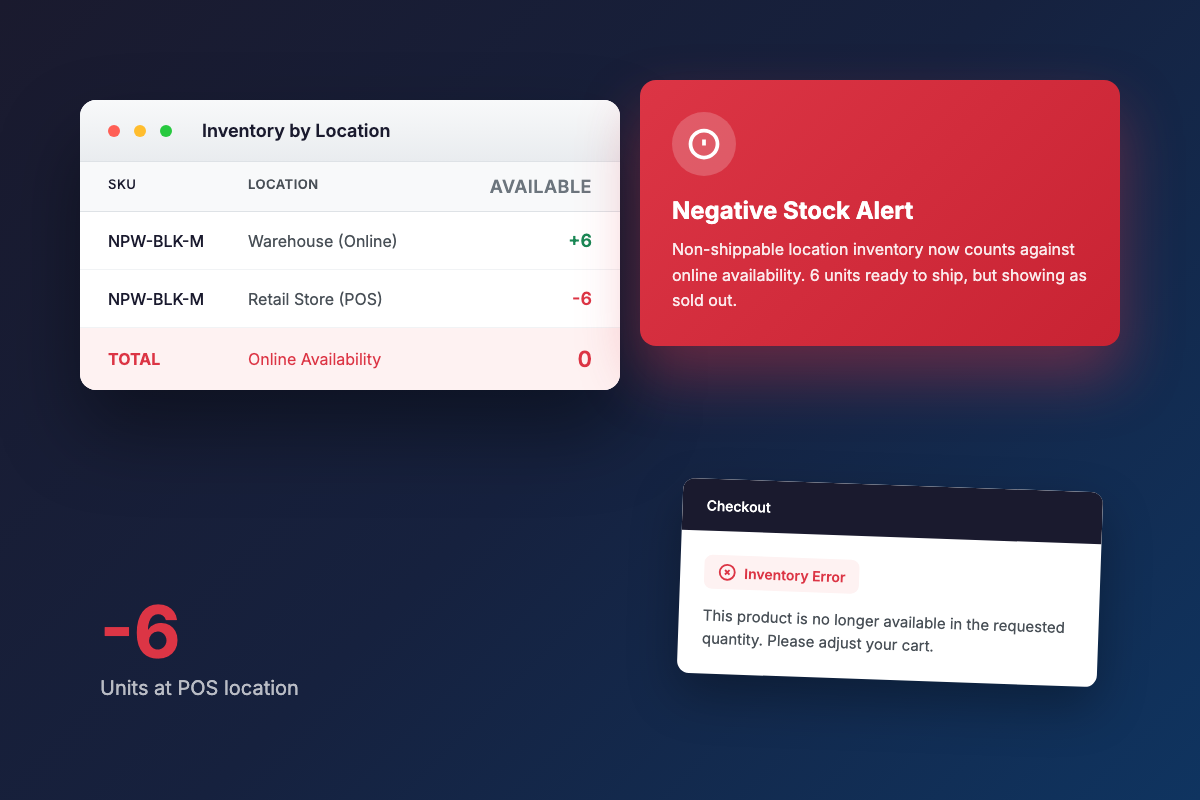
Since mid-July 2026, some Shopify merchants have run into a confusing pattern: products with healthy warehouse stock appear sold out online, or shoppers add items to cart and then get an inventory error at checkout.
The cause is a change to how Shopify calculates online availability. According to a thread on r/shopify from July 13, 2026 (reddit.com/r/shopify/comments/1uvg2ij), Shopify now counts negative stock at non-shippable locations into online availability. The thread is still active, with merchants reporting the same symptom: “customers can add to cart but at checkout they get an error.”
Any store with more than one location is potentially affected, specifically where at least one location (often a retail or POS spot) has gone negative on a SKU.
About this guide: Dash Checkout makes a checkout app for Shopify. This guide covers Shopify’s native settings and third-party options too, including cases where Dash is not involved at all.
This post walks through the exact inventory math behind the failure, the native workaround and where it falls short, a cleanup checklist, and why the same change also breaks restock alert apps.
What changed in July 2026
Before the change, a non-shippable location sitting at a negative count did not subtract from what the online store displayed. Online availability effectively drew from locations set up to fulfill online orders.
After the change, Shopify adds negative quantities at non-shippable locations into the online availability number. A location that cannot ship a single unit can now push a sellable product to zero or below.
A non-shippable location is any location not enabled for online order fulfillment in Settings > Locations. These are typically POS retail stores, repair benches, or locations with online fulfillment turned off. Their stock was never meant to serve online orders in either direction.
On the add-to-cart-then-checkout-error gap: the r/shopify 1uvg2ij thread describes shoppers successfully adding to cart, then hitting an inventory rejection at checkout. The post treats this as reported behavior from the thread rather than a verified breakdown of Shopify’s internal checkout mechanics.
No Shopify changelog entry was verified for this post. The Reddit thread is the primary source. Do not expect a Shopify help article at a specific URL for this specific change.
The inventory math, with a worked example
Walk one SKU through the failure.
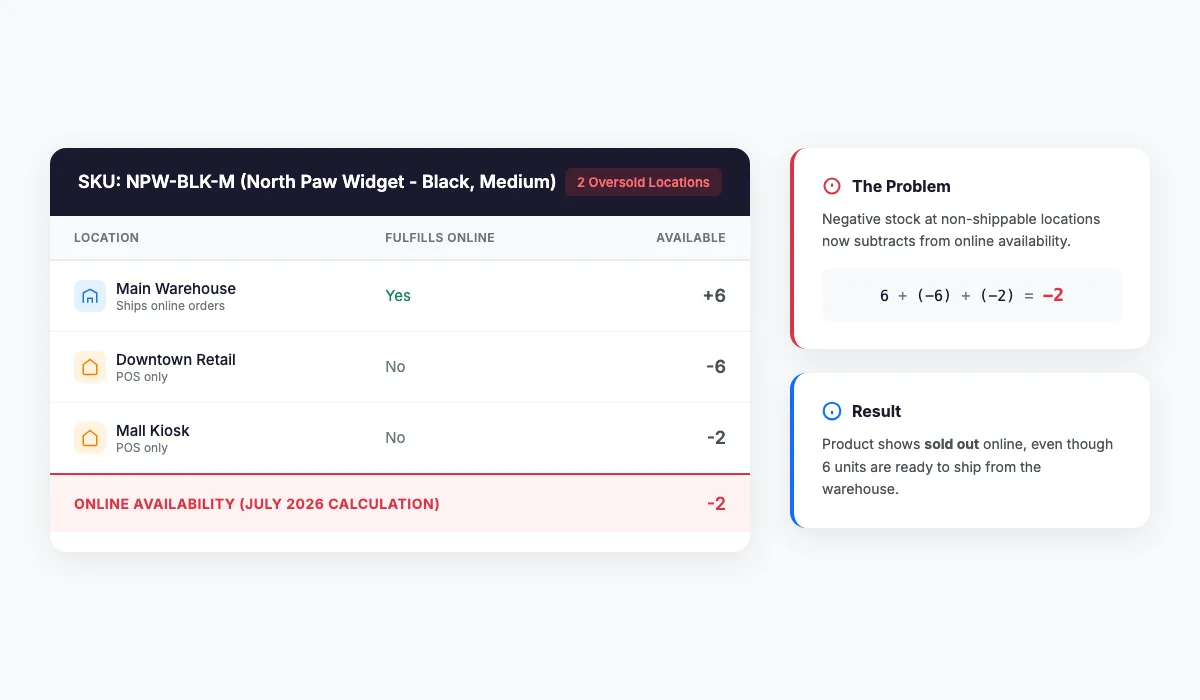
Example 1, phantom sellout:
- Warehouse (ships online orders): 6 units
- Retail store (POS only, non-shippable): -6 units after overselling in person
- New online availability: 6 + (-6) = 0
The product shows sold out online while six units sit ready to ship.
Example 2, checkout error:
- Warehouse: 4 units
- Retail store: -2 units
- Online availability shows: 2
If the retail location slips further negative before the shopper completes checkout, the final inventory check rejects the order. The merchant sees phantom sellouts or checkout errors on stock they physically hold.
The key point: a negative number at one location is a bookkeeping artifact, an oversell record. The new math treats it as real anti-inventory that cancels shippable units elsewhere.
This kind of multi-location availability math has bitten merchants before. An r/shopify thread from August 2024 (reddit.com/r/shopify/comments/1ewwpyd) describes multi-location availability calculations breaking a merchant’s “Notify me” plugin entirely, well before the July 2026 change. The availability total and per-location truth have always been able to diverge; the July change made it happen more visibly.
Why a location goes negative in the first place
POS overselling. Shopify POS can complete a sale even when the tracked count at that location is lower than the quantity sold. The count goes below zero.
“Continue selling when out of stock” enabled on a variant. This setting lets any sales channel sell past zero.
Refunds and returns restocked to the wrong location. When a return gets restocked to a different location than the one the order shipped from, one site inflates and the other goes negative.
Manual adjustments or transfers recorded against the wrong location. Same outcome.
Order edits and exchanges. These can pull from a location that never physically held the item.
Negative counts were always messy, but they used to be locally contained. The July change made them globally contagious across channels. That is why cleanup suddenly matters more than before.
The native workaround: “Show only fulfillable inventory”, and why it is only partial
Merchants in the r/shopify 1uvg2ij thread point to a setting called “Show only fulfillable inventory.” It limits the online store’s availability calculation to locations that can actually fulfill online orders, so the non-shippable location’s negative count stops dragging the total.
Flip this on to stop the bleeding. But be aware of three limits.
It does not fix the underlying record. The oversell is still on the books, waiting to skew reports, inventory transfers, and anything reading raw totals.
Apps and integrations still see the dragged-down number. Back in stock alert apps, product feeds, and ERPs that read total inventory across locations do not benefit from the storefront filter. The r/shopify 1ewwpyd thread shows a “Notify me” plugin breaking on exactly this kind of availability math.
It can mask genuine stock problems. If your fulfillable warehouse count is itself wrong, the setting hides the symptom that would have exposed it.
The right sequence: flip the setting to stop the damage today, then work through the checklist below to reconcile the negative counts.
A cleanup checklist for oversold locations
1. Find the negatives. Filter the Inventory page by location and sort by available quantity ascending. Export inventory CSVs per location if that is easier. Anything below zero is an oversell record to explain.
2. Reconcile each one. If the units were genuinely sold and not returned, adjust the count to zero with a documented adjustment reason. If it is a transfer or restock-location mistake, move the quantity to the location that actually holds it.
3. Audit Settings > Locations. Confirm which locations are allowed to fulfill online orders, and confirm that list matches physical reality.
4. Review “Continue selling when out of stock” per variant. Switch it off anywhere overselling is not an explicit choice. Pre-orders and made-to-order goods are legitimate exceptions.
5. Check your refund flow. Pick the correct restock location during refunds instead of accepting the default. The Shopify Community has had an open complaint about default restock-on-refund behavior since 2021 (community.shopify.com/c/shopify-discussions/please-please-please-disable-default-restock-item-it-s-so/td-p/1160011, 20+ replies, still unsolved). That default behavior can restock a returned item to the wrong location, rebuilding the negative elsewhere.
6. Recheck weekly during POS-heavy periods. Negative counts come back as long as the process that created them recurs.
For the prevention side of this, the inventory protection rules post covers proactive stock controls before a big sale or restock.
The knock-on effect: restock alerts fire wrong or never fire
The same total-versus-per-location gap that breaks availability also breaks back-in-stock tooling, because most of it keys off the inventory total.
The foundation is Shopify’s variants/in_stock webhook. It fires when total inventory across all locations crosses from zero to positive, and its payload carries no per-location data. A Shopify Community thread (community.shopify.com/t/variants-in-stock-and-out-of-stock-webhooks-not-coming-in/379495) documents that the webhook requires every location to reach zero before an out-of-stock event fires, and developers report the webhook not arriving at all.
The direction where alerts never send. A -6 retail location plus a 6-unit warehouse nets to 0. Alert apps watching the total believe the product is out of stock and never notify the waitlist, even though online orders could ship today. Real stock at the warehouse goes unannounced.
The direction where false alerts go out. A restock at a non-shippable location, or a refund auto-restocked to the wrong spot, nudges the total across zero and blasts the waitlist for stock nobody can buy. A Swym merchant review describes the app sending “hundreds of back in stock alerts for products that were still out of stock.” An Appikon review reports it “misfires for us all the time.”
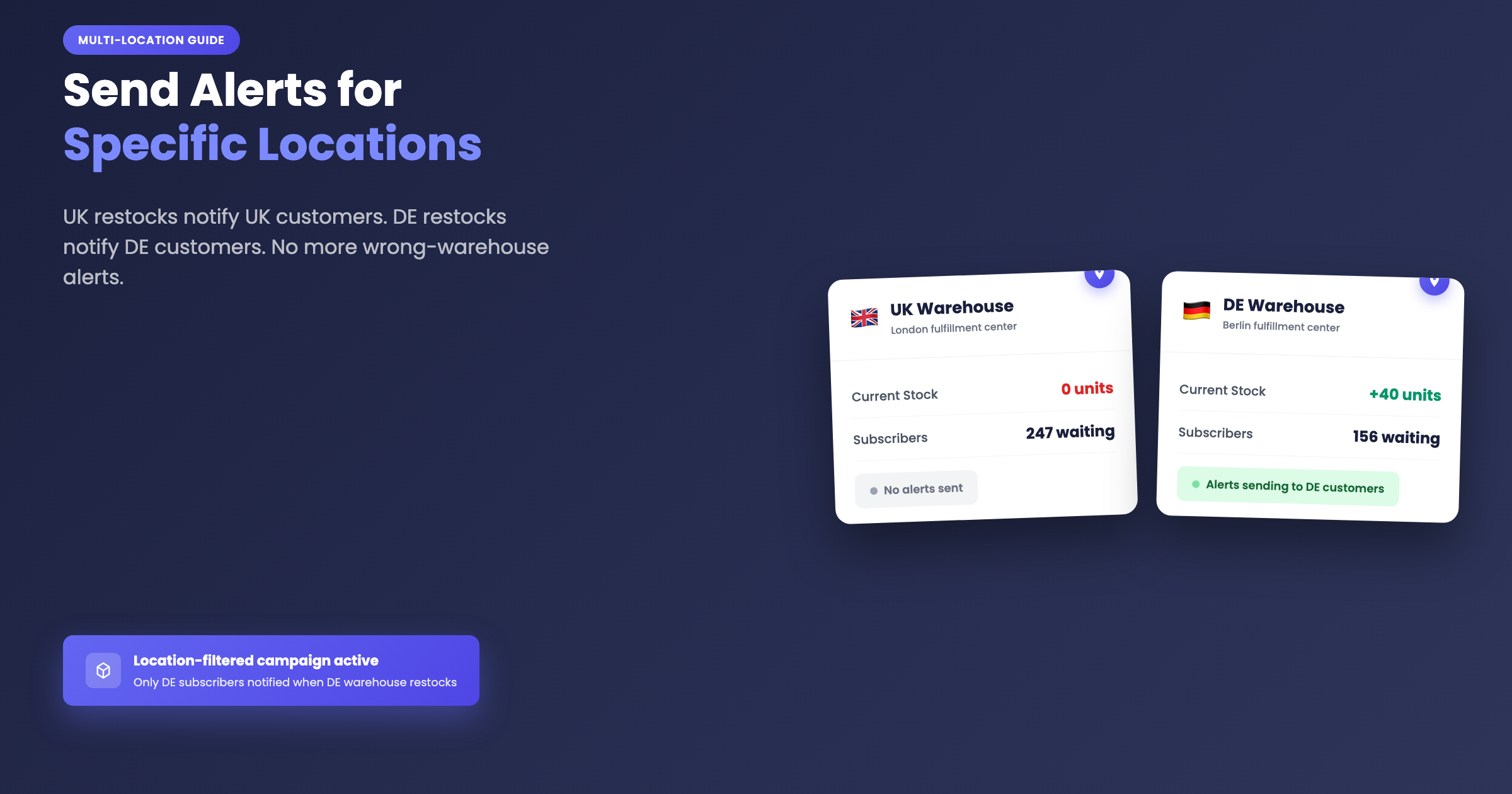
The location-blindness is not new. A June 2024 r/shopify thread (reddit.com/r/shopify/comments/1dpdv5g) includes the comment “UK customers will get notified when your DE warehouse gets restocked… I am yet to find an app which supports this.” Klaviyo staff confirmed in their own community that Klaviyo’s native back in stock “does not distinguish between inventory at different store locations” (community.klaviyo.com/strategic-advice-27/back-in-stock-flow-multiple-locations-19261 and community.klaviyo.com/marketing-30/back-in-stock-notification-for-only-one-shopify-location-2354). The Shopify Community thread asking for location-specific restock notifications has been open since 2021 without a solution (community.shopify.com/t/notify-customers-when-item-back-in-stock-in-specific-location/46099).
After July 2026, any alert tool that reads only the total is now wrong in both directions on multi-location stores.
What oversold-location-aware alerting looks like
Dash Checkout’s Back in Stock feature was built around per-location inventory rather than the total. This section covers how that intersects with the July 2026 problem.
Campaigns have a “Count inventory at” setting, a checkbox list of the shop’s Shopify locations. Leaving all boxes unchecked counts total inventory across every location, which stays the default. Selecting specific locations tells the campaign to only watch those.
The core behavior for oversold situations: when a campaign is counting selected locations, oversold locations with negative available inventory count as zero in the sum. A -6 retail store does not cancel out 6 real units at the warehouse, so subscribers still get notified when real stock is present. Dash also treats a variant as in stock when any location has positive availability, even when an oversold location drags the raw total to zero or below.
Because Shopify’s variants/in_stock webhook is total-only, location-filtered campaigns are evaluated by a poller that checks live per-location inventory roughly every 30 seconds via GraphQL. Location alerts arrive within about 30 seconds of a qualifying restock. This is worth stating plainly: location-filtered alerts are not instant. The ~30 second window is the trade-off for getting per-location accuracy.
Thresholds are level-triggered: an alert fires when combined stock at the selected locations reaches the campaign’s minimum (default 1), rather than only at the restock moment. A trickle restock of 1 with a threshold of 3 sends nothing until stock actually reaches 3. That is the guard against the cancelled-order and refund-restock false alarms merchants have complained about for years. A 2022 r/shopify thread (reddit.com/r/shopify/comments/y4z5vx) captures the ask plainly: “won’t message 300 people when 1 unit comes back in stock when I cancel an order.” The same question came up again in December 2024 (reddit.com/r/shopify/comments/1hc9027, 50 subscribers re-alerted after cancellations).
When a location-filtered alert fires, the activity feed records per-location quantities at trigger time for the selected locations, so a merchant can see exactly which locations pushed the total over the threshold.
Channels are email and browser push. Browser push is included on every plan; the shopper accepts a browser permission prompt after signing up. Email alerts require the Pro plan. Signups are always collected on any plan, and emails resume automatically after upgrading for variants still in stock. For plan details, see the pricing page.
On competitive context, these are the safe claims: Klaviyo’s native back in stock cannot trigger by location at all (staff-confirmed above); Swym gates location control behind its $99.99/mo Premium plan; STOQ’s location selection is global across the store rather than per-campaign. None of those competitors document how they handle oversold, negative-inventory locations. Dash is not the only app with location triggers or thresholds, but documented oversold handling is where the gap shows up.
The short version
Three things to take away.
The July 2026 change makes negative counts at non-shippable locations subtract from online availability, producing phantom sellouts and checkout errors.
Enabling “Show only fulfillable inventory” plus reconciling negatives to zero fixes the storefront display. The setting alone is not enough.
Total-based restock alerts stay broken on multi-location stores unless the tool reads per-location inventory and zeroes out oversold locations in its math.
Run the negative-inventory audit this week, before the next POS rush recreates the problem. Negative counts are easy to miss until they cause visible failures, and the July change made those failures much more common.
For the broader picture on how Shopify platform changes affect purchase flows, the June 2026 checkout defaults post covers what that update meant for order limits specifically.