· Dash Checkout · back-in-stock · 11 min read
How to send back in stock alerts for a specific Shopify location
A Shopify Community thread asking for restock alerts that watch a single warehouse has been open since 2021 with no working answer. This guide explains why most apps cannot do it, what a correct per-location trigger has to get right, and how to set it up with campaigns in Dash Checkout.
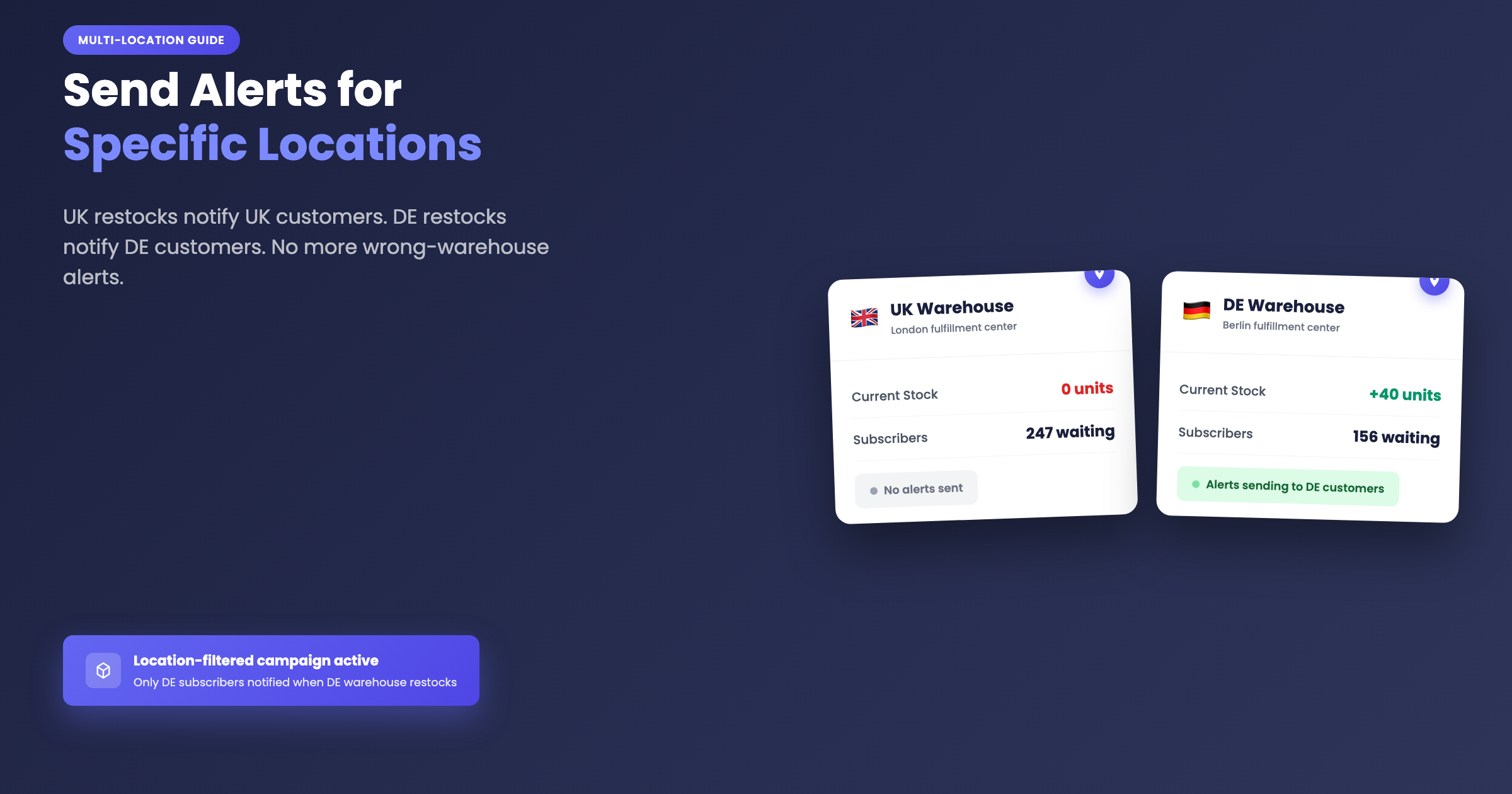
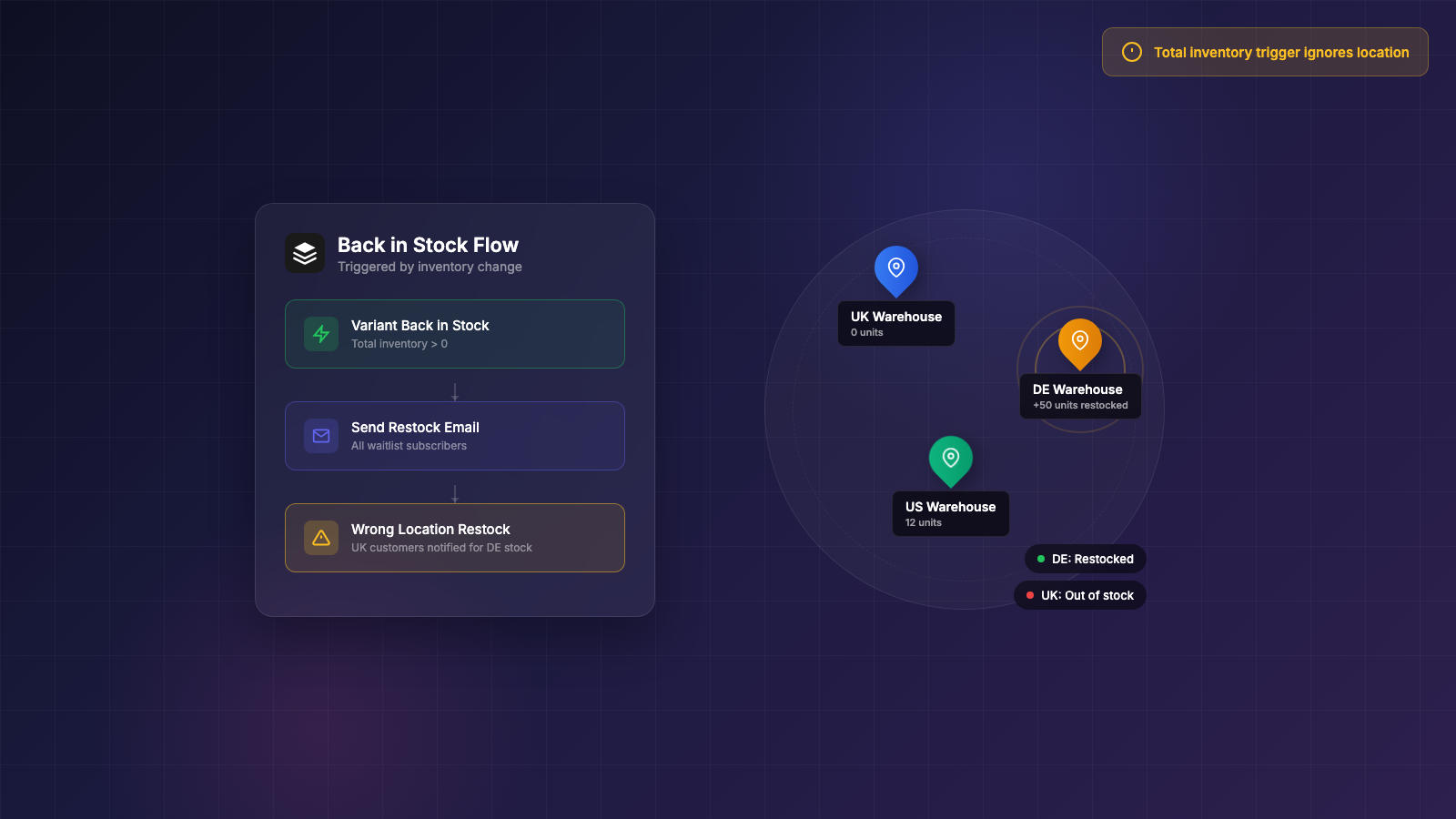
You stock the same product in two warehouses, one for the UK and one for Germany. Your DE warehouse gets a shipment and replenishes to 40 units. A minute later, 300 UK customers get an email telling them the item is back in stock. They click through, try to buy, and find out the stock is in Germany, not available to them.
That scenario was described in a June 2024 thread on r/shopify: “UK customers will get notified when your DE warehouse gets restocked… I am yet to find an app which supports this.” The Shopify Community has had an open thread titled “Notify customers when item back in stock in specific location” since 2021. It still ranks on Google for that exact question. As of this writing, it still has no accepted answer.
This guide covers why the gap exists, what a correct per-location implementation has to handle, and how to set it up.
About this guide: Dash Checkout makes a Shopify checkout app. We also recently launched a Back in Stock feature, which is what this guide primarily covers. We also mention alternatives so you can pick the right tool for your situation.
Why most back in stock apps only see your store-wide total
The root cause is Shopify’s webhook.
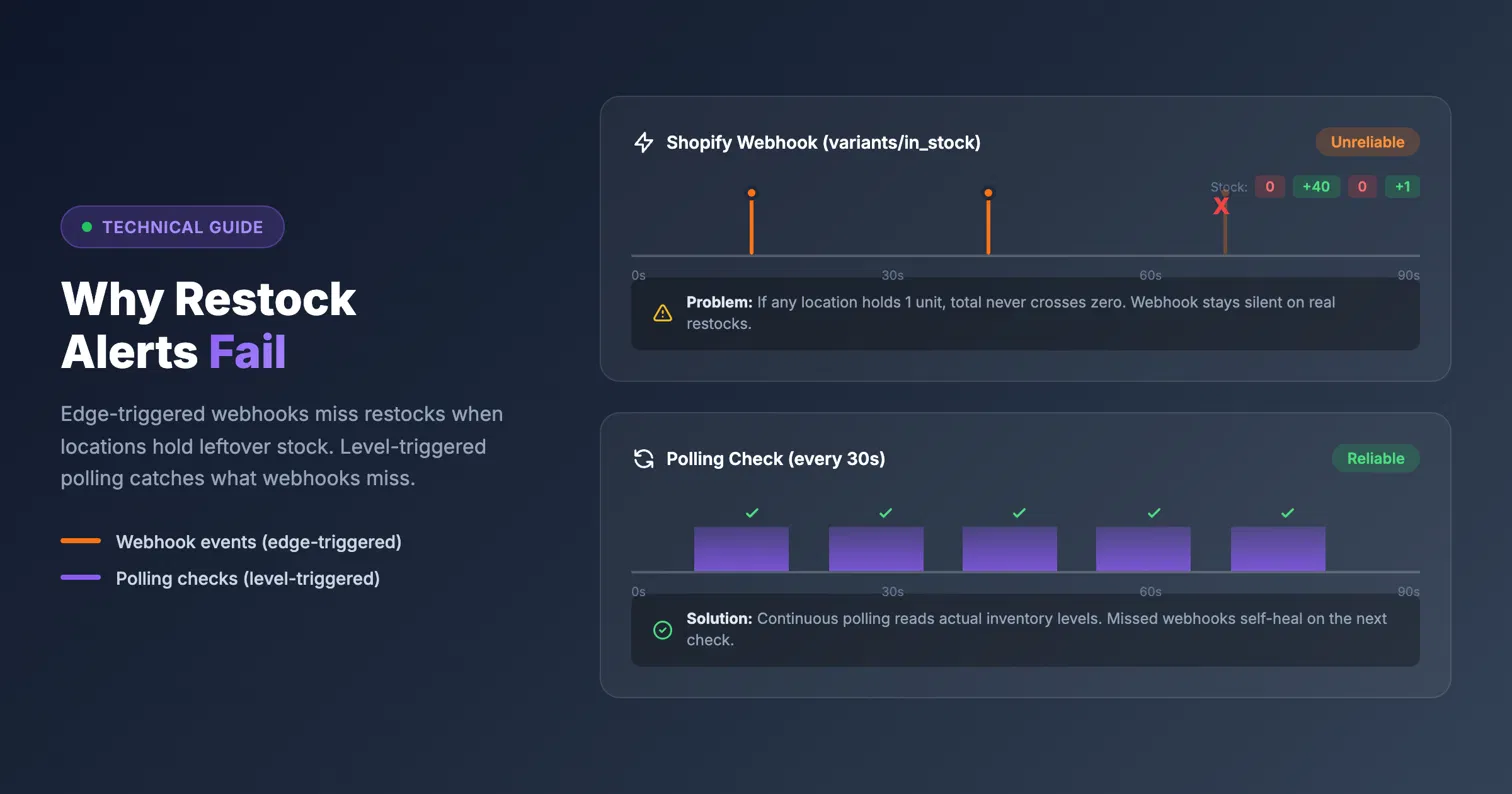
Most back in stock apps listen for Shopify’s variants/in_stock webhook, which fires when a variant’s total inventory across all locations crosses from zero to positive. The key limitation: the payload carries no per-location data at all. It tells you a variant is back in stock somewhere. It has no idea where.
That creates two problems.
First, the webhook cannot even fire per location. If your London warehouse is empty but Berlin has 40 units, the total across both warehouses is already positive, so the webhook never fires at all. Your London subscribers never get notified even when the right stock arrives, because Shopify’s webhook only triggers on the crossing from zero.
Second, the webhook itself is unreliable. A Shopify Community thread from merchants tracking this issue notes that the webhook requires every location to reach zero inventory before it will re-fire. Merchants report it sometimes never arrives at all.
Klaviyo is the clearest documented example of this limitation. Klaviyo staff confirmed in their own community that the native back in stock feature “does not distinguish between inventory at different store locations.” The limitation has been raised in the Klaviyo community for about five years. The workaround Klaviyo staff suggest is thresholds or a custom API integration.
The same June 2024 Reddit thread where the UK/DE problem was described also captures another consequence: a Klaviyo user reports that a momentary restock triggered the back in stock flow and wiped their entire waitlist queue. One cancelled order returned a unit, the webhook fired, 300 people got emailed, and the list was gone for when real stock arrived.
In August 2024, a separate r/shopify thread asked “does such a thing exist?” for back in stock alerts by market or location, and received no app name in reply.
What per-location triggering has to get right
Getting the right notification to the right subscriber takes more than watching a different data field. There are three specific failure modes any per-location implementation has to handle.
Oversold locations
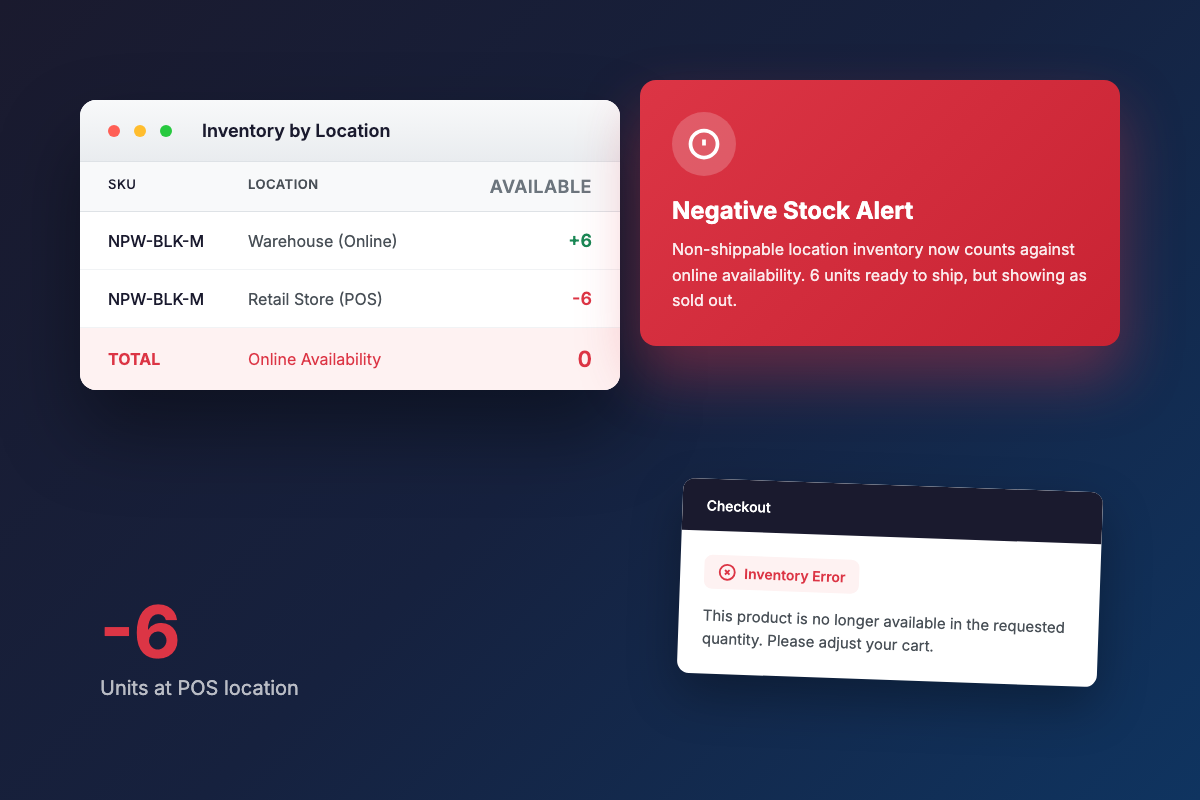
Multi-location inventory goes negative all the time. Unfulfilled orders, refunds, sync errors, and manual adjustments all contribute. A July 2026 r/shopify thread describes a live version of this problem: Shopify was counting negative stock at non-shippable locations into online availability, which meant “customers can add to cart but at checkout they get an error.”
If a naive implementation sums across locations and treats a warehouse at -5 as a real subtraction, that can cancel out 3 genuine units at the warehouse you care about. A correct implementation treats negative location quantities as zero in the sum rather than allowing one oversold warehouse to drag down the reading for other locations.
A separate August 2024 Reddit thread reported that multi-location availability math broke a merchant’s “notify me” plugin outright, which shows this is not a theoretical edge case.
Momentary restocks
Cancelling one order returns one unit, and that single unit can trigger an alert blast to your entire waitlist. A 2022 r/shopify thread put it plainly: the merchant wanted an app “that won’t message 300 people when 1 unit comes back in stock when I cancel an order.” A December 2024 thread asked the same question, this time with 50 subscribers getting re-alerted after a cancellation.
A 2021 Shopify Community thread with 20+ replies describes the same pain from a different angle: Shopify’s auto-restock on refund triggers “items in stock” alerts, and merchants report that “hundreds” of subscribers receive notifications for what amounts to one returned item.
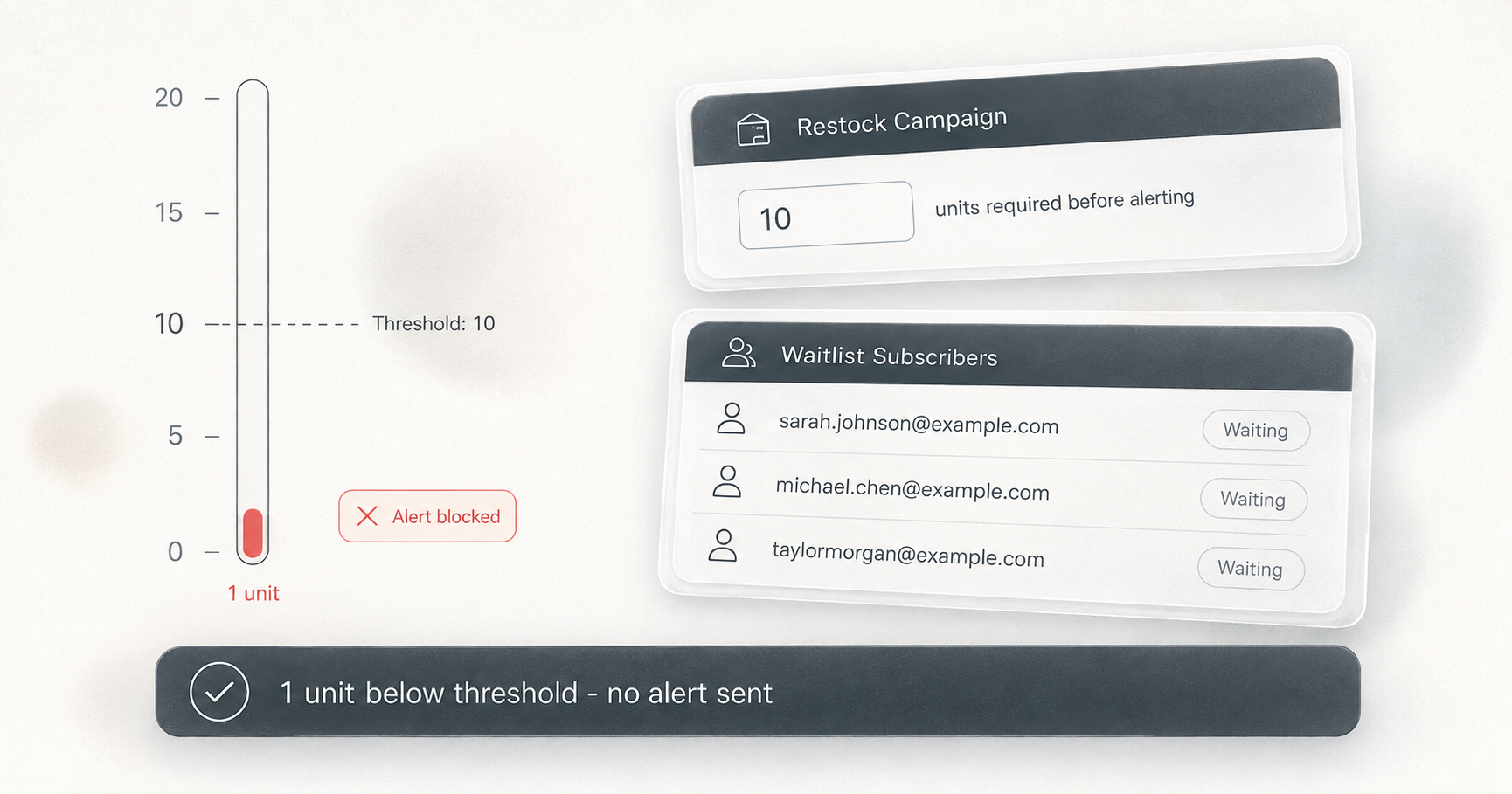
The fix is a minimum-inventory threshold. Rather than alerting on any crossing of zero, the app waits until stock reaches a defined floor, say 3 or 5 units, before sending anything. When set correctly, a single cancelled order sits below the threshold and nobody gets emailed.
The data source
Because Shopify’s webhook payload is total-only with no location breakdown, per-location triggering cannot use webhooks to evaluate location-level state. The app has to poll Shopify’s inventory levels API directly, check each location separately, and make its own determination about whether qualifying stock exists at the locations a subscriber cares about. That polling also has to catch the cases webhooks miss: downtime, late arrivals, and restocks that came in below the threshold but have since risen above it.
Step by step: location-filtered restock alerts with Dash campaigns
Dash Checkout’s Back in Stock feature handles all three failure modes above. Here is how to set it up.
Step 1: Enable Back in Stock in Preferences
In the Dash Checkout admin, go to Preferences and tick “Enable Back in Stock alerts.” This creates a Default Campaign that covers all products, activates two storefront surfaces (a product-page form and a popup), and starts watching inventory across your store. The feature is currently badged Beta in the app.
Step 2: Add the storefront blocks
From the “Storefront setup” card, use the deep links to open your theme editor. Add the “Back in Stock Alert” block to your product pages (this shows an inline signup form when a product is sold out) and optionally enable the “Back in Stock Popup” app embed. Both blocks support full text and color customization; leaving color fields blank inherits from your active theme, which keeps dark-theme stores looking correct.
Step 3: Create a campaign per region or warehouse
Rather than relying solely on the Default Campaign, create a new campaign for each warehouse or region you want to track separately. Give it a descriptive name like “UK warehouse.” In the target products section, choose which products, tags, or variants this campaign covers.
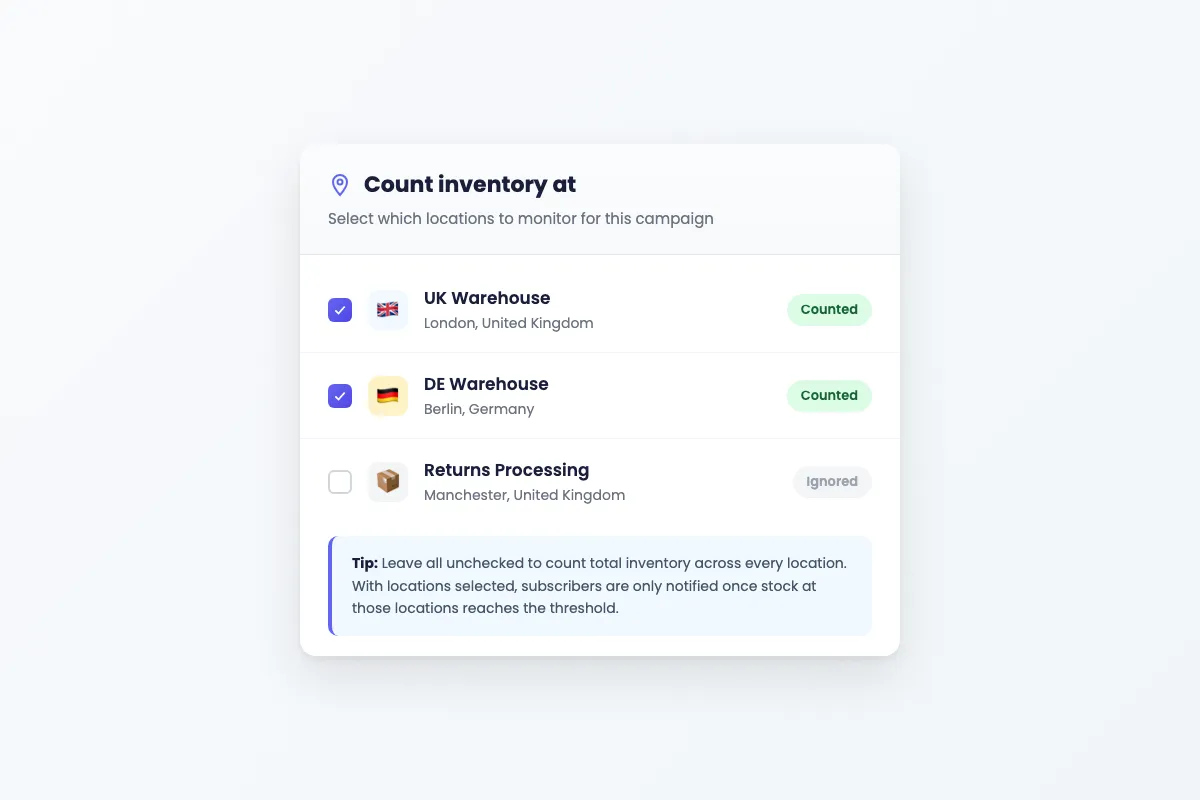
Step 4: Select the locations to watch
This is the key setting. Under “Count inventory at,” you will see a checkbox list of your Shopify locations, loaded live from your store. Check the boxes for the locations you want this campaign to monitor.
The in-app help text explains the logic: “Leave all unchecked to count total inventory across every location. With locations selected, subscribers are only notified once the combined stock at those locations reaches the threshold.”
If you have a UK campaign watching your UK warehouse and a DE campaign watching your DE warehouse, signups on UK-eligible products route to the UK campaign, and alerts fire based on UK warehouse stock only. If the location list fails to load, a fallback field accepts comma-separated location IDs directly.
Step 5: Set the minimum inventory threshold
Under “Minimum inventory to trigger notifications,” the default is 1. For the cancelled-order problem described earlier, raise this to 3 or 5. A single returned unit will sit below the threshold and nobody gets emailed. Alerts wait until stock at the selected locations reaches your threshold before anyone is notified.
Step 6: Set up notification channels
Two channels are available: email and browser push.
Email alerts require the Pro plan. The important detail: signups are always collected on every plan. If you are currently on a lower plan, subscribers accumulate as pending, and when you upgrade, a catch-up job automatically notifies waiting subscribers for products that are still in stock at that moment. See the pricing page for plan details.
Browser push is free on every plan. After a shopper signs up for email alerts, the widget offers an “Also get a browser alert” button. The shopper has to grant browser permission separately, so it is not automatic for all subscribers.
Step 7: Configure batching if needed
By default, Dash sends notifications in batches of 100, with follow-up batches at least 1 minute apart. If your waitlist is large and your restock is small, reducing the batch size means you send only to the number of subscribers you can realistically serve before stock runs out. The “Notifications per batch” setting accepts values from 1 to 1,000.
Optional: per-language email templates
If you serve multiple regions, Dash ships default email copy in 137 languages. Delivery picks the best template per subscriber based on their locale, then falls back through the language code, your shop’s primary language, and English. You can customize per-language templates directly in the campaign editor for Subject, Heading, Body, Button, and Footer text using {{ product_title }} as a variable.
How the location trigger math works
Because Shopify’s webhook carries no per-location data, location-filtered campaigns do not use the webhook path for their qualifying logic. Instead, an inventory poller runs approximately every 30 seconds, checking current stock levels at your selected locations.
When the poll runs, Dash sums available inventory across your selected locations. Oversold locations (negative available quantity) count as zero in that sum. A warehouse at -8 does not cancel out 5 real units at the London warehouse you selected.
A variant is also treated as in stock if any selected location has positive availability, even if the raw total across all locations is zero or below.
Alerts fire when inventory at the selected locations reaches the threshold, not just on any restock event. A restock of 1 with a threshold of 3 sends nothing. The alert goes out when stock later reaches 3, whether that happens in the same restock or a subsequent one. This also handles the case where an app was down during a restock: the next poll catches up.
Location-filtered alerts arrive within about 30 seconds of a qualifying restock. Total-inventory campaigns with no locations selected get the faster webhook path when stock crosses zero, but location-filtered campaigns rely on the poller.
Shops with more than 500 watched variants get a random sample per poll run, with full coverage within a few minutes. For most stores, a single 30-second poll cycle covers everything.
Duplicate sends are handled by marking a subscription as notified before the email is queued. A webhook and a poll running simultaneously on the same restock cannot both trigger the same notification.
Alternatives worth evaluating
Dash is not the only option with some form of location awareness. Here is an honest look at the alternatives.
Swym Back in Stock Alerts has location control and thresholds, but location control is gated to the Premium plan at $99.99 per month. App Store reviews document reliability issues, including one that states it “randomly started sending out hundreds of back in stock alerts for products that were still out of stock.”
STOQ offers location selection, but the setting is global across the entire store rather than per-campaign. You cannot run a UK campaign watching the London warehouse and a DE campaign watching Berlin at the same time.
Kbite Back In Stock lists multi-location support and a minimum inventory limit on its lower-priced plans. Worth testing if budget is the main constraint.
Notify Me! automatically filters to online-fulfillable locations only. According to its own help documentation, merchants cannot choose which specific locations are counted.
Appikon Back In Stock exposes a quantity_required API parameter, but no location-level triggers were found in its documentation. A reviewer reported the app “misfires for us all the time.”
Klaviyo native back in stock cannot trigger by location at all, as confirmed by Klaviyo staff in their community forum. The workaround is thresholds or building a custom API integration.
Three things to check on any app’s documentation before installing: per-campaign location choice (not just a global toggle), documented handling of oversold or negative inventory, and a minimum-inventory threshold that holds alerts until meaningful stock arrives.
Before your next restock lands
The 2021 Shopify Community thread stayed unanswered because Shopify’s webhook cannot see individual locations, and any real fix has to poll per-location inventory directly, zero out oversold warehouses, and hold alerts to a threshold that filters out single returned units.
Dash Checkout’s Back in Stock campaigns handle all three. Signups are collected on every plan, browser push notifications are free on every plan, and per-campaign location filtering is available now.
If you have products going to restock soon and customers waiting in multiple regions, setting up location-filtered campaigns before that stock arrives means UK subscribers hear about UK stock, and German subscribers hear about German stock.
Get started at dashcheckout.io/back-in-stock. Plan details are on the pricing page.
Related guides: