· Dash Checkout · back-in-stock · 11 min read
Klaviyo back in stock and multiple locations: limits and fixes
Klaviyo's back in stock trigger reads one inventory total across all Shopify locations. How far the threshold workaround goes, and when a per-location app fits better.
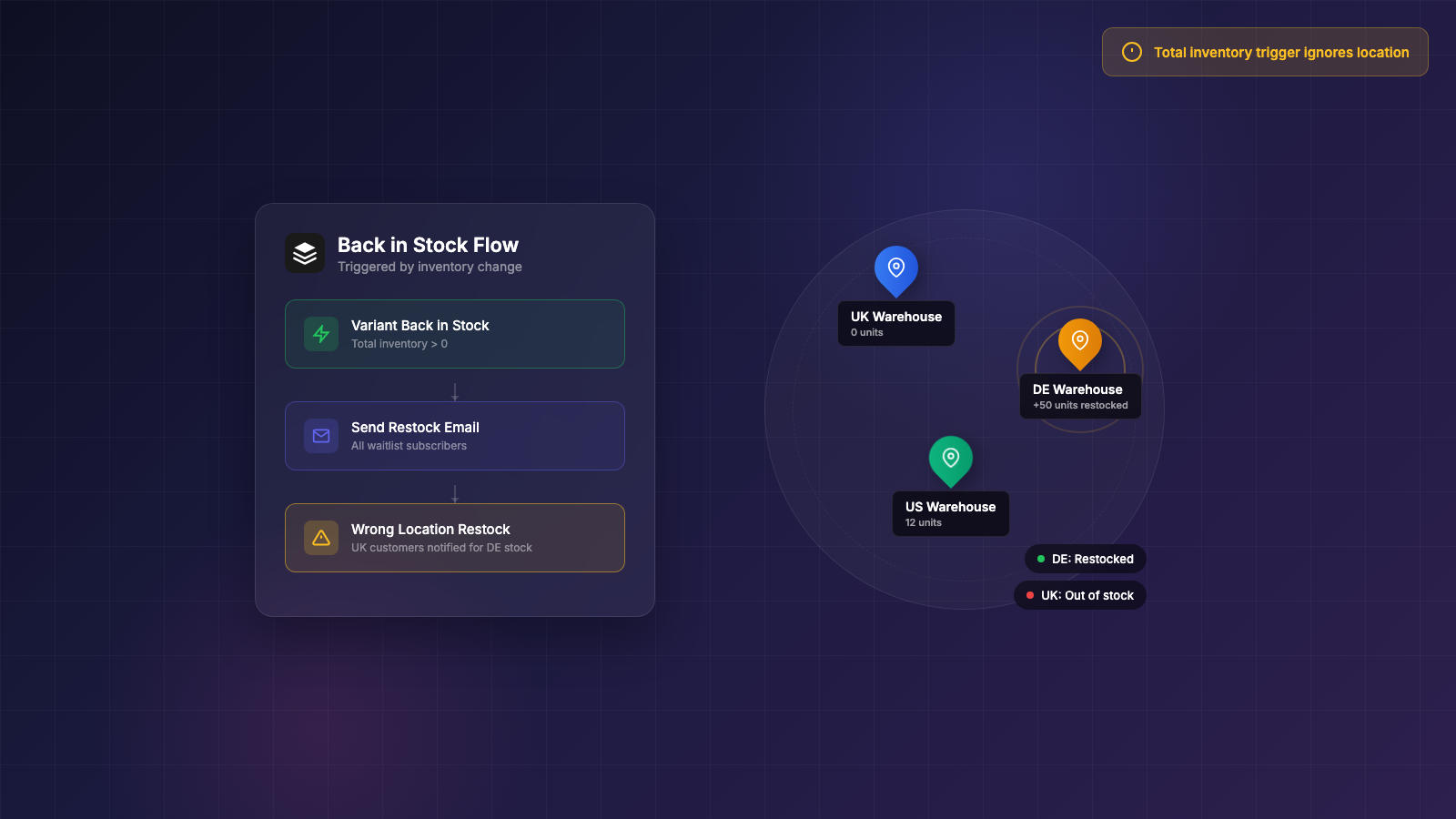
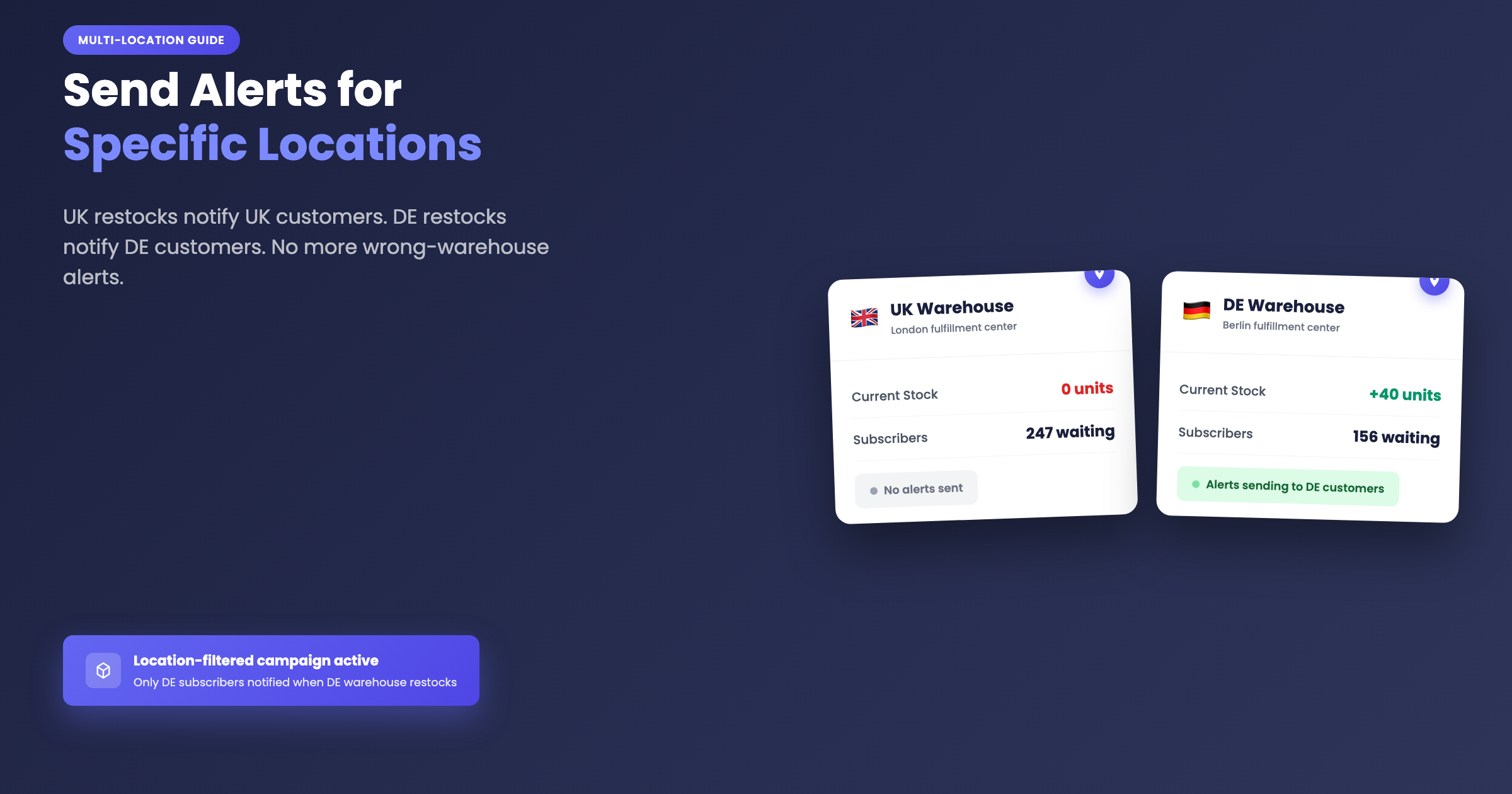
A shopper in the UK signs up for a restock alert on a product. Your Germany warehouse gets restocked. Every subscriber, including the UK customers, gets the email. They click through to buy, and find stock that ships from the wrong country.
That exact scenario was described in a June 2024 r/shopify thread this way: “UK customers will get notified when your DE warehouse gets restocked… I am yet to find an app which supports this.”
Two months later, a different merchant posted “Back In Stock Function - Per Market” asking “does such a thing exist?” and got no app name in response.
These questions come up because Klaviyo’s native back in stock flow is well built for email marketing, but has a documented gap with multiple Shopify locations. This guide covers what Klaviyo does well, exactly where the gap is (in Klaviyo’s own staff words), how far the threshold workaround goes, and how to decide whether a dedicated app belongs in your stack.
About this guide: Dash Checkout makes a Shopify checkout and back in stock app. This guide covers Klaviyo’s native option and third-party apps fairly, including cases where Klaviyo alone is the right answer.
What Klaviyo back in stock genuinely does well
Klaviyo’s strength is the flow and segmentation layer that sits on top of the restock trigger.
When a subscriber signs up for a restock alert through Klaviyo, they land in your main profile database alongside every other contact. That means you can branch flows by VIP tier, purchase history, or engagement score. You can follow up with campaigns later, run A/B tests on subject lines, and keep those customers inside your existing suppression list and sender reputation.
Subscriber data stays inside your email program. You do not have to export lists or sync contacts between tools. Everything happens in one place, which has real operational value when you are managing segmentation and deliverability together.
The email sending and segmentation side is solid. The limitation is specifically what triggers the flow, which is an inventory detection problem rather than an email problem. That distinction matters for how to fix it.
The multi-location gap, confirmed by Klaviyo staff
Klaviyo staff confirmed in their own community that the native back in stock trigger “does not distinguish between inventory at different store locations.” The limitation appears in two separate threads: one on strategic advice for multiple locations and another on notifying customers for only one Shopify location. Merchants have raised this in Klaviyo’s community for roughly five years. The workarounds staff offer are inventory thresholds or building a custom API integration.
In practice, a trigger that reads one summed number across every location creates two problems. A restock at a retail-only location emails online subscribers who still cannot check out. A regional warehouse restock alerts customers in markets that warehouse does not serve, which is exactly the UK/DE case from the intro.
Plenty of merchants are asking for the same thing. The Shopify Community thread “Notify customers when item back in stock in specific location” has been open since 2021 and still ranks on Google for this exact question with no working answer in the thread.
Another problem shows up in the same June 2024 Reddit discussion: a Klaviyo user reported that momentary restocks, a single unit returning from a cancelled order, fired the back in stock flow and lost the waitlist queue. The phantom restock notified the entire list. Those subscribers get marked as notified and will not receive the alert when real stock arrives.
Why Shopify’s inventory signals make this hard for every tool
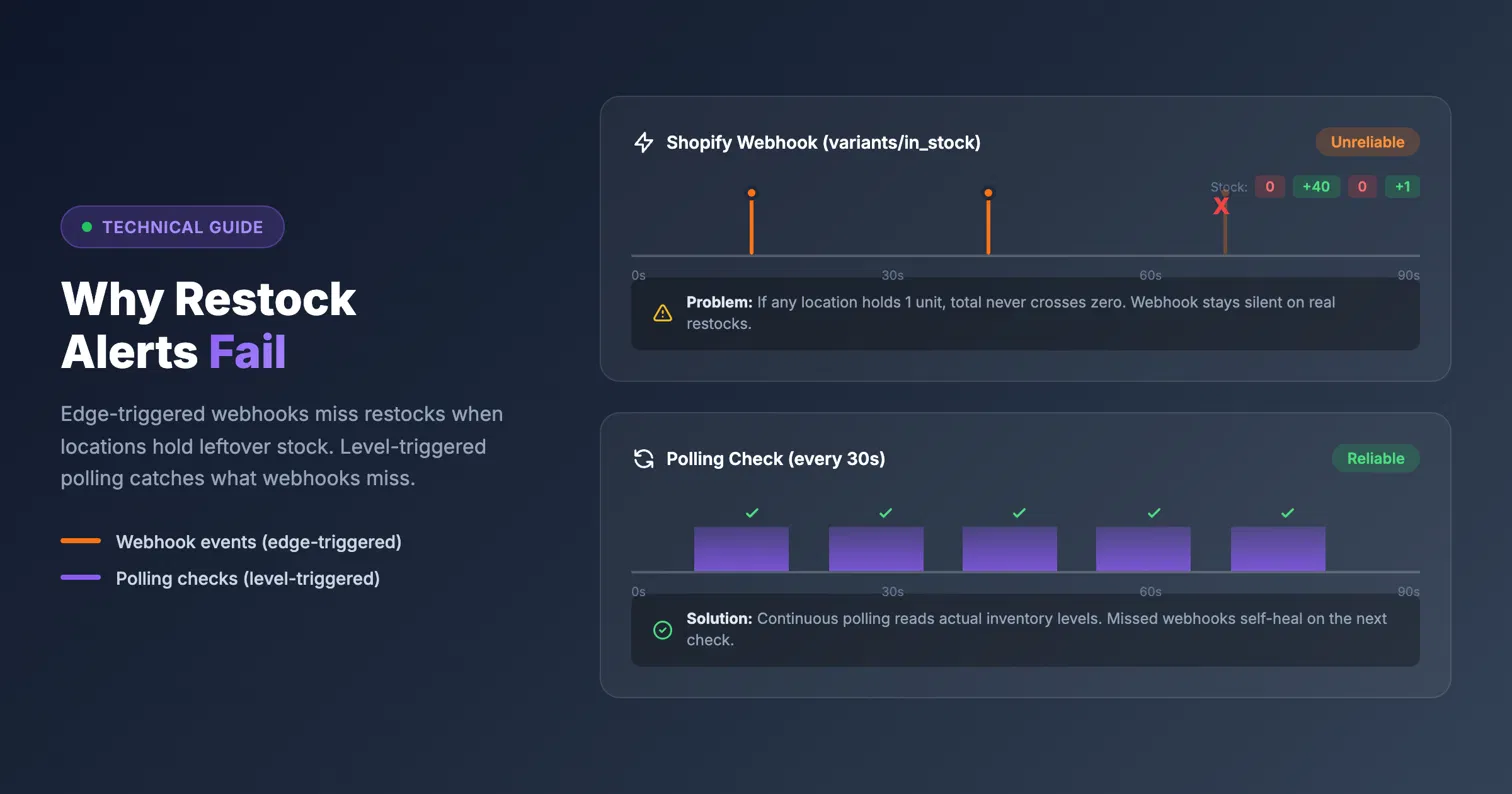
Part of the problem sits upstream. Shopify’s variants/in_stock webhook fires when a variant’s total inventory across all locations crosses from zero to positive. The webhook payload carries no per-location data. There is no per-location restock webhook for apps to subscribe to.
That same webhook has reliability problems. A Shopify Community thread on the topic documents that the webhook requires every location to reach zero before an out-of-stock event fires, and that the event sometimes never arrives at all.
Cancelled orders and refunds create phantom restocks on top of this. A 2022 r/shopify thread (y4z5vx) asked for an app that “won’t message 300 people when 1 unit comes back in stock when I cancel an order.” In December 2024, another merchant posted the same question after cancelled orders re-alerted their 50 subscribers. A Shopify Community thread open since 2021, with 20+ replies and no resolution, documents auto-restock on refund blasting “items in stock” emails to hundreds of people.
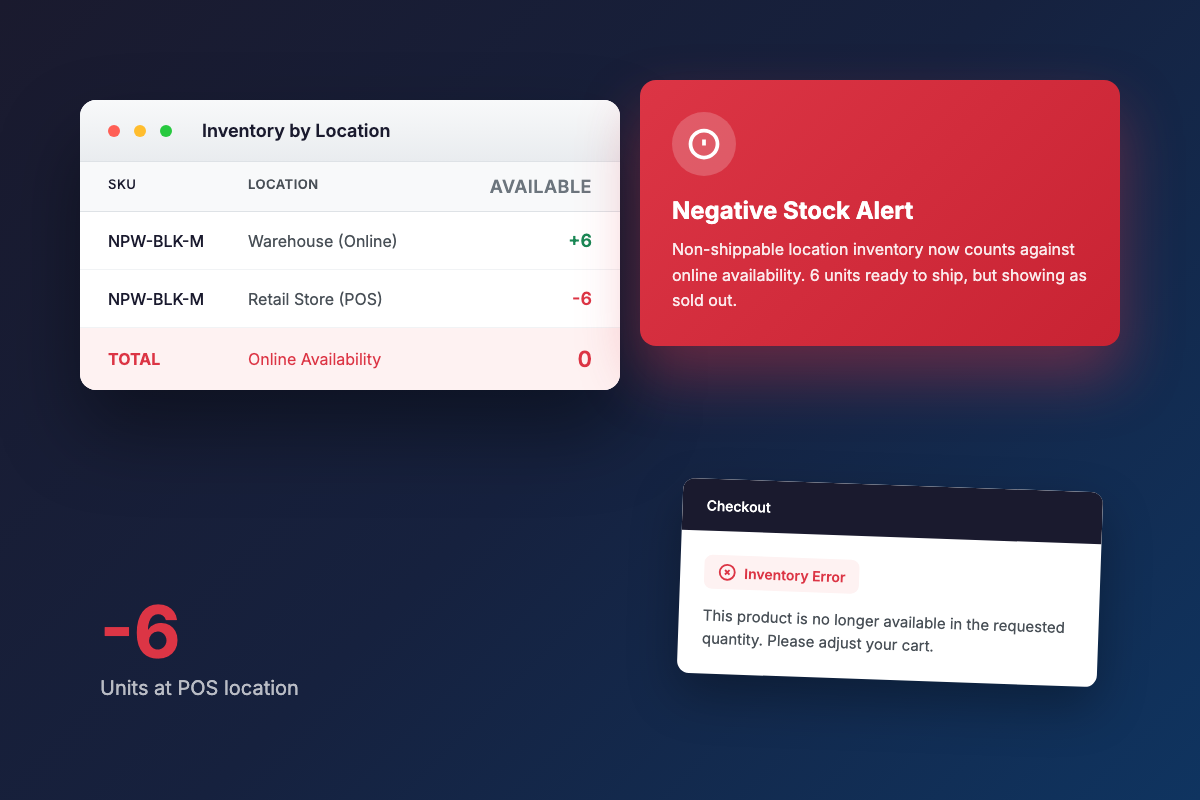
Since July 2026, the inventory math has gotten messier. A July 2026 r/shopify thread reports that Shopify now counts negative stock at non-shippable locations into online availability, so “customers can add to cart but at checkout they get an error.” An August 2024 thread (1ewwpyd) shows multi-location availability math breaking a merchant’s notification plugin outright.
Any alert tool that leans only on Shopify’s total-inventory signal inherits all of this. Fixing the location problem requires polling per-location inventory levels directly.
Klaviyo’s threshold workaround: what it fixes and where it stops
The workaround Klaviyo staff recommend in the two community threads above is setting an inventory threshold so the flow only triggers when stock reaches a certain number of units, or building a custom API integration.
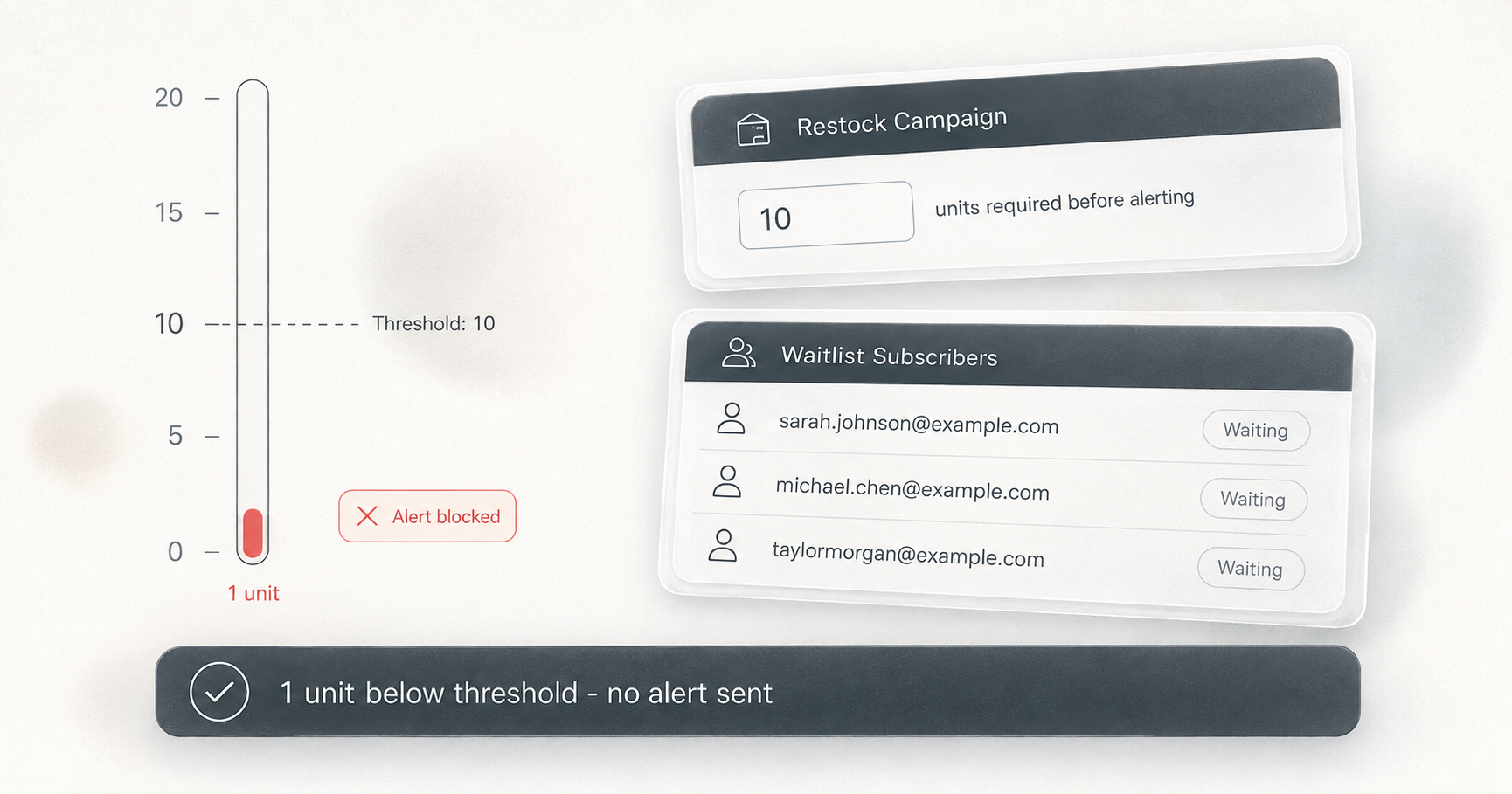
Thresholds deserve honest credit. A threshold above 1 absorbs the single-unit cancellation blip. One returned unit no longer wakes up the whole list. Some momentary restocks get filtered out too, because they may not reach the threshold number.
The hard limit is that a threshold still evaluates one summed number across every location. If 40 units arrive at a retail-only location, that clears any reasonable threshold and emails online subscribers who cannot buy. A threshold changes how much total stock is needed before alerts fire. It cannot tell the trigger where that stock is.
Thresholds also cannot help with the July 2026 negative-stock behavior. An oversold non-shippable location skews the very total the threshold reads. If your retail store has -6 units and your warehouse has 6, the threshold sees a total of zero regardless of how you set it.
The custom API route is real but means developer time, webhook handling, and maintaining per-location inventory logic yourself. That is exactly the work most merchants install an app to avoid.
If all your locations fulfill online orders and stock rarely blips from cancellations, Klaviyo native plus a sensible threshold is a reasonable setup. The gap becomes significant when locations serve different purposes or different markets.
What dedicated back in stock apps offer, and their catches
Several apps have some form of location handling or thresholds. The relevant questions are how much control you get and at what price. No single app has an exclusive on either feature.
Notify Me! automatically filters to online-fulfillable locations only. Merchants cannot choose which locations count, per the app’s own documentation. This works well for pure e-commerce stores, but offers no control for anyone who wants a specific warehouse or retail store to drive alerts.
Appikon Back in Stock exposes a quantity_required API parameter, but no location triggers appear in its documentation. Reviews document reliability issues, including one stating it “misfires for us all the time.”
Swym Back in Stock Alerts has both location control and thresholds. Location control is gated to the Premium plan at $99.99/mo. Reviews document phantom alert storms, with one merchant describing the app as having “randomly started sending out hundreds of back in stock alerts for products that were still out of stock,” and others reporting hours-long inventory sync lag.
Kbite lists multi-location support and a minimum inventory limit on its lower-cost plans, making it worth evaluating if budget is the main constraint.
STOQ has both thresholds and location selection, but the location setting is global across the whole store rather than per-campaign. A merchant cannot point one product line at the EU warehouse while pointing another at a US warehouse.
One gap cuts across all of these competitors: none of them document how they handle oversold locations with negative inventory, which the July 2026 thread shows is now a live issue for multi-location stores.
How per-campaign location triggers work in Dash
One approach that works well for multi-location stores is keeping Klaviyo for campaigns, newsletters, and flows while a dedicated app handles restock detection and alert sending. The two tools do not overlap; Dash sends its own email and browser push alerts through its own pipeline. There is no Klaviyo integration.
Dash’s Back in Stock feature currently carries a Beta badge in the app. Each campaign has a “Count inventory at” setting: a checkbox list of the store’s Shopify locations. Leaving all boxes unchecked counts total inventory across every location, which is the default. With specific locations selected, subscribers are only notified once combined stock at those locations reaches the campaign’s minimum.
Because the setting is per campaign, a store can run a UK campaign watching the UK warehouse and an EU campaign watching the DE warehouse independently. Signups route to exactly one campaign based on priority (0 to 5), so a subscriber does not receive alerts from both.
The math handles oversold locations directly. When a campaign counts selected locations, any location with negative availability counts as zero. A retail store at -8 units cannot cancel out 6 real units at a selected warehouse. Dash also treats a variant as in stock when any location has positive availability, even if the netted total across all locations is zero or below.
Thresholds are level-triggered, which closes the cancelled-order problem. Alerts fire when current stock at the selected locations reaches the campaign’s minimum, not just when a restock event occurs. A restock of 1 unit against a threshold of 3 sends nothing until stock actually reaches 3. The threshold is checked on a schedule, not only at the moment of a restock event.
Detection runs on two paths. Shopify’s total-inventory webhook covers total-inventory campaigns, firing when stock crosses zero. A poller re-checks every variant with waiting subscribers roughly every 30 seconds, fetching per-location inventory levels. Location-filtered campaigns are evaluated by that poller, so location alerts arrive within about 30 seconds of a qualifying restock. The poller also self-corrects missed or delayed webhooks.
Subscriptions are marked notified before their email is queued, which prevents duplicate sends. Alerts go out in configurable batches, defaulting to 100 per batch, up to a maximum of 1000, with a configurable delay and at least one minute between follow-up batches.
When a location-filtered alert fires, the activity feed records the quantity, the campaign’s threshold, and per-location quantities at trigger time for the selected locations, so a merchant can see exactly why the alert went out.
Channels are email and browser push. Browser push is free on every plan; the shopper approves a browser permission prompt after signing up. Email alerts require the Pro plan, but signups are collected on every plan. Subscribers waiting at upgrade time are automatically notified for variants still in stock. For plan details, see the pricing page.
Restock emails ship with default copy in 137 languages plus merchant-editable per-language templates, selected by subscriber locale.
Which setup fits your store
The right choice depends on what your locations actually do.
Klaviyo’s native back in stock is a reasonable fit when you have a single location, or every location fulfills online orders and you are comfortable with a total-inventory trigger. It also suits stores where restock volumes are large enough that a simple threshold absorbs blips, and where keeping every tool inside one platform matters for your team.
A dedicated app earns its place when you mix retail and online locations that should not share the same waitlist, when regional warehouses serve different markets, when cancelled orders or refunds have caused false alerts before, when oversold or negative-inventory locations are part of your operation, or when you want different product lines watching different warehouses, which requires per-campaign location control.
The both-tools pattern is common: keep Klaviyo running your newsletters and marketing flows, and let a purpose-built app decide when a restock is real and where it happened. The trigger problem and the email problem are separate, and they can be solved by separate tools.
If you want to try the per-campaign location approach, Dash Checkout’s Back in Stock campaigns are at dashcheckout.io/back-in-stock, and you can install Dash Checkout from the Shopify App Store to set one up. If you are weighing your options for products that are gone for longer stretches, the best Shopify preorder apps guide covers the pre-purchase side.