· Dash Checkout · back-in-stock · 10 min read
Back in stock alerts not sending on Shopify? Webhooks vs polling
Shopify's restock webhook only fires when total inventory crosses zero, so alerts can blast phantom notifications or stay silent after a real restock. Here is the difference between edge-triggered webhooks and level-triggered polling, and how to diagnose a waitlist that never hears back.
You restocked 40 units on Tuesday. Your waitlist had 300 people on it. Nobody got an email.
Or the reverse: a customer cancels one order and hundreds of people get told an item is back when it is still sold out.
Both failures trace back to one design decision inside every restock alert app: how does it find out that inventory changed? There are two ways to find out, being told about a change, or continuously checking the number, and each one fails differently.
About this guide: Dash Checkout makes a Shopify checkout app whose Back in Stock feature is currently in beta. This post explains the underlying Shopify mechanics and applies equally to native flows like Klaviyo and third-party alert apps.
The two ways restock alerts go wrong
A Swym review on the Shopify App Store describes the app “randomly started sending out hundreds of back in stock alerts for products that were still out of stock.” An Appikon review on the Shopify App Store says it “misfires for us all the time.” Both complaints describe the failure modes of a detection architecture that every alert app has to choose. The rest of this post explains that choice.
The classic phantom trigger is a cancelled order. In 2022, a merchant on r/shopify searched for an app that “won’t message 300 people when 1 unit comes back in stock when I cancel an order”. The exact same question came up again in December 2024, this time about 50 subscribers being re-alerted after a cancellation. Two years apart, identical problem.
Refunds trigger it too. A Shopify Community thread has collected 20+ replies since 2021 about the refund flow’s restock checkbox silently pushing an item to 1 unit and blasting “items in stock” emails to hundreds of subscribers. The thread is still open and unsolved.
The other failure mode is silence: the restock genuinely happens and the alert never sends. Merchants find out weeks later when waitlist customers bought from a competitor. That failure comes from how Shopify’s webhook is defined.
Any back in stock app, including ours, has to answer one question correctly: how do you know stock really changed, by how much, and where?
Edge triggers: how Shopify’s variants/in_stock webhook actually works
An edge-triggered system is told when a value crosses a line, like a doorbell. It hears the crossing event, not the ongoing state. Shopify’s webhook topic for this is variants/in_stock, with variants/out_of_stock as its mirror.
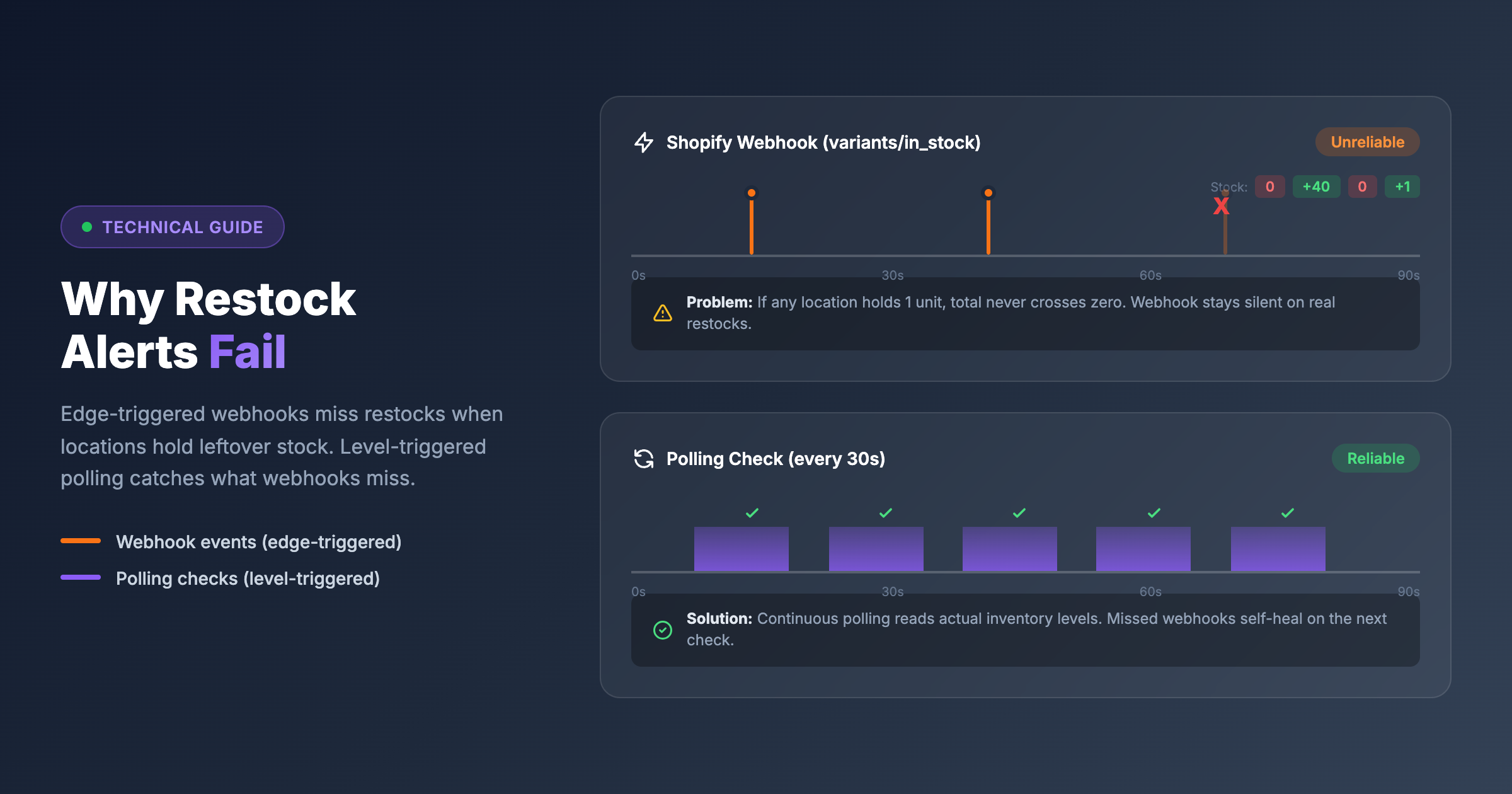
The mechanics that matter: variants/in_stock fires when a variant’s total inventory, summed across all locations, crosses from zero to positive. The payload is total-only. It carries no per-location breakdown.
A Shopify Community thread on webhook reliability makes two important points. First, the webhook requires every location to reach zero before it can fire again. Second, developers report it arriving unreliably even when conditions are met.
Those two facts create both failure modes.
Silence: if one forgotten location holds a single leftover unit, total inventory never touches zero. A 500-unit warehouse restock produces no webhook and no alert, because the system never heard the doorbell.
Phantom storms: any zero-to-one flicker, a cancelled order, a refund restock, a momentary correction, is a legitimate crossing event. The doorbell rings and the blast goes out.
Momentary restocks carry a second cost in edge-only systems. In a June 2024 r/shopify thread, a Klaviyo user describes a momentary restock firing the flow and losing the entire waitlist queue. The list got spent on stock that vanished in minutes. Those subscribers are now marked notified and will not receive the real restock alert.
A webhook that does not arrive leaves no trace. An app that only listens for the doorbell has no way to notice it missed a ring.
Multi-location stores get the worst of it
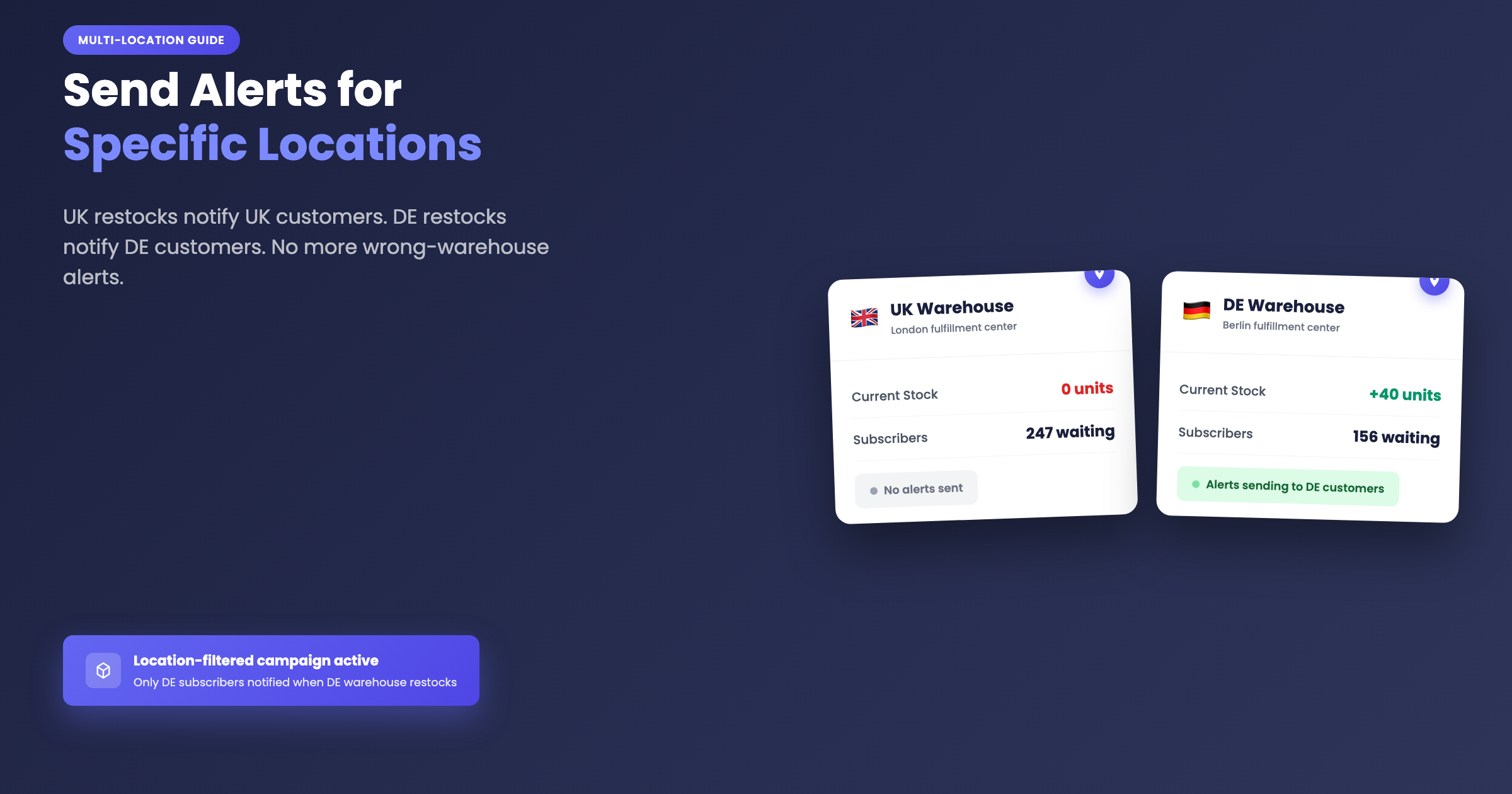
From the same June 2024 thread: “UK customers will get notified when your DE warehouse gets restocked… I am yet to find an app which supports this.”
That is not a new complaint. A Shopify Community thread asking to notify customers when an item is back in a specific location has been open since 2021, is still unsolved, and ranks on Google. In August 2024, a merchant asked for per-market back in stock alerts and got no app name in reply.
Klaviyo’s own staff confirm on their community forum (thread 1, thread 2) that Klaviyo’s back in stock “does not distinguish between inventory at different store locations.” Merchants have raised it for roughly five years. The suggested workarounds are thresholds or building a custom API integration.
The reason it stays unsolved: the webhook payload is total-only, so location awareness cannot come from the webhook at all. It can only come from an app going and reading inventory levels itself.
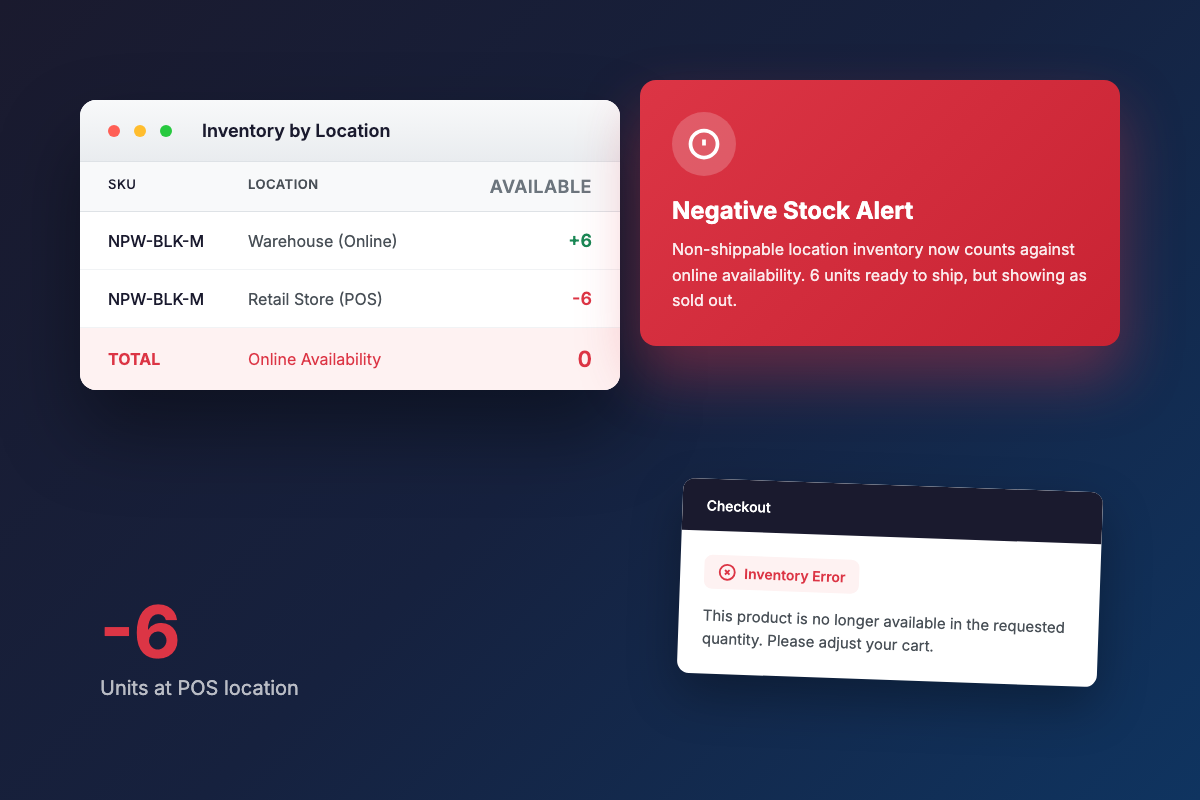
There is also a 2026 wrinkle. A July 2026 r/shopify thread reports that Shopify now counts negative stock at non-shippable locations into online availability, so “customers can add to cart but at checkout they get an error.” An August 2024 thread describes multi-location availability math breaking a Notify Me plugin outright. Oversold locations now quietly poison naive inventory sums.
Level triggers: polling the actual numbers
A level-triggered system does not wait for a doorbell. Instead, it keeps asking “what is the quantity right now, and does it meet the condition?” on a regular schedule. It compares state, not events.
Here is what that fixes:
- Missed events self-heal. If a webhook never arrives or the app was down, the next poll sees the current stock and acts on it.
- Thresholds become meaningful. A restock of 1 against a threshold of 3 correctly sends nothing until stock actually reaches 3, which absorbs the cancelled-order and refund flickers described above.
- Per-location quantities are visible, because the poll reads real inventory levels rather than a total-only payload.
The threshold protection is exactly the workaround Klaviyo staff point merchants toward in those forum threads. Polling is what makes a threshold enforceable.
There are honest tradeoffs. Polling adds latency between checks, costs API calls, and demands a careful dedupe design, since asking the same question every 30 seconds means the app must be structurally unable to answer “send” twice for one subscriber.
Edge triggers are fast but fragile. Level triggers are correct but not instant. Neither alone is the full answer, which is the actual explanation for why these apps misfire.
How Dash runs both at once
Both trigger paths feed a single processing pipeline. This section describes one way to solve the problem, not the only way.
Speed path: Shopify’s variants/in_stock webhook delivers the instant case. For campaigns counting total inventory, alerts go out within seconds when stock crosses zero.
Correctness path: a scheduler tick runs every 30 seconds and re-checks live inventory for every variant that has pending subscribers, comparing real quantities against each campaign’s threshold. A missed webhook, app downtime, or a restock that lands below the threshold (say, 0 to 1 with a threshold of 3) is caught and corrected on the next poll.
Dedupe by construction: a subscription is atomically marked notified before its email is queued, so double-sends are impossible even when the webhook and a poll arrive close together on the same restock. Alert triggered events are deduped to one per campaign and variant per hour.
Location-filtered campaigns run on the poller only, because the webhook carries no location data. In practice that means about 30 seconds of latency rather than webhook-instant. The poll fetches per-location inventory levels for up to 20 locations per variant.
The oversold math from those Reddit threads is handled explicitly. A location with negative available inventory counts as zero in the sum, so one oversold warehouse cannot cancel out real stock at a selected store. A variant also counts as in stock when any single location is positive, even if the overall total is at or below zero.
For stores with more than 500 watched variants, a random 500-variant sample runs per poll pass, with full coverage expected within a few minutes. The webhook stays the instant path for those shops.
When an alert fires, the activity feed’s “Alert triggered” event records the variant, the current quantity, and the campaign’s threshold. For location-filtered campaigns it also includes per-location quantities at trigger time, so a merchant can see exactly why subscribers were notified.
Checklist: what to check when your alerts are not sending
This section covers the most common reasons alerts stay silent, with the Dash Back in Stock campaign settings as the worked example.
Check your threshold first. Thresholds are level-triggered, which means they fire when stock reaches the number, not just when any restock happens. A restock of 2 against a threshold of 5 staying silent means the campaign is working exactly as configured. Look at the “Minimum inventory to trigger notifications” setting on the campaign before assuming something is broken.
Check your plan. Restock emails require the Pro plan, and the check happens at send time. Signups are always collected on any plan. Browser push is free on every plan. Upgrading triggers an automatic catch-up that notifies waiting subscribers for variants still in stock at upgrade time. For plan details, see the pricing page.
Check your location filters. With locations selected in “Count inventory at,” only combined stock at those locations counts toward the threshold. Alerts arrive via the approximately 30-second poll rather than instantly. All checkboxes unchecked means total inventory across every location is counted.
Browser push is a separate opt-in. The shopper must accept the browser’s permission prompt after signing up. A subscriber who dismissed that prompt gets email only. A missing push alert is usually an unaccepted permission, not a bug.
Batching paces delivery. Campaigns send in batches, with a default of 100 per batch and a maximum of 1,000. The first batch goes immediately. Follow-up batches wait at least 1 minute even with the delay set to zero, so a 500-person waitlist drains over several minutes by design.
Three questions worth asking any restock alert vendor before you install:
- Is your detection edge-triggered, level-triggered, or both?
- What happens when a cancelled order restocks one unit?
- Can I count inventory at only selected locations, and does an oversold location subtract from the total?
For context: Klaviyo’s native back in stock flow cannot trigger by location at all, per its own staff. Swym gates location control behind its $99.99/mo Premium plan. STOQ’s location selection applies across all products globally rather than per campaign. No vendor we reviewed documents how they handle oversold or negative-inventory locations.
Pick the app that keeps checking
The phantom alert storms and the silent waitlists in those community threads are the two faces of edge-only detection. The fix is an app that also keeps checking the real numbers on a schedule, handles the threshold at the level rather than the edge, and zeros out oversold locations instead of letting them drag the total.
Dash Checkout’s Back in Stock feature (currently in beta) uses the hybrid approach described above, with email and browser push alerts, campaign thresholds, and per-campaign location filters. You can read more about the feature and try it on your store.
If you are selling products that are gone for a longer stretch rather than briefly out of stock, the preorder feature page covers that pattern instead.