· Dash Checkout · back-in-stock · 11 min read
Best back in stock apps for multi-location Shopify stores (2026)
Most restock alert apps only see your total inventory, so a warehouse restock on another continent can email customers who cannot buy from it. We compared six apps on per-location triggers, notify thresholds, and oversold handling.
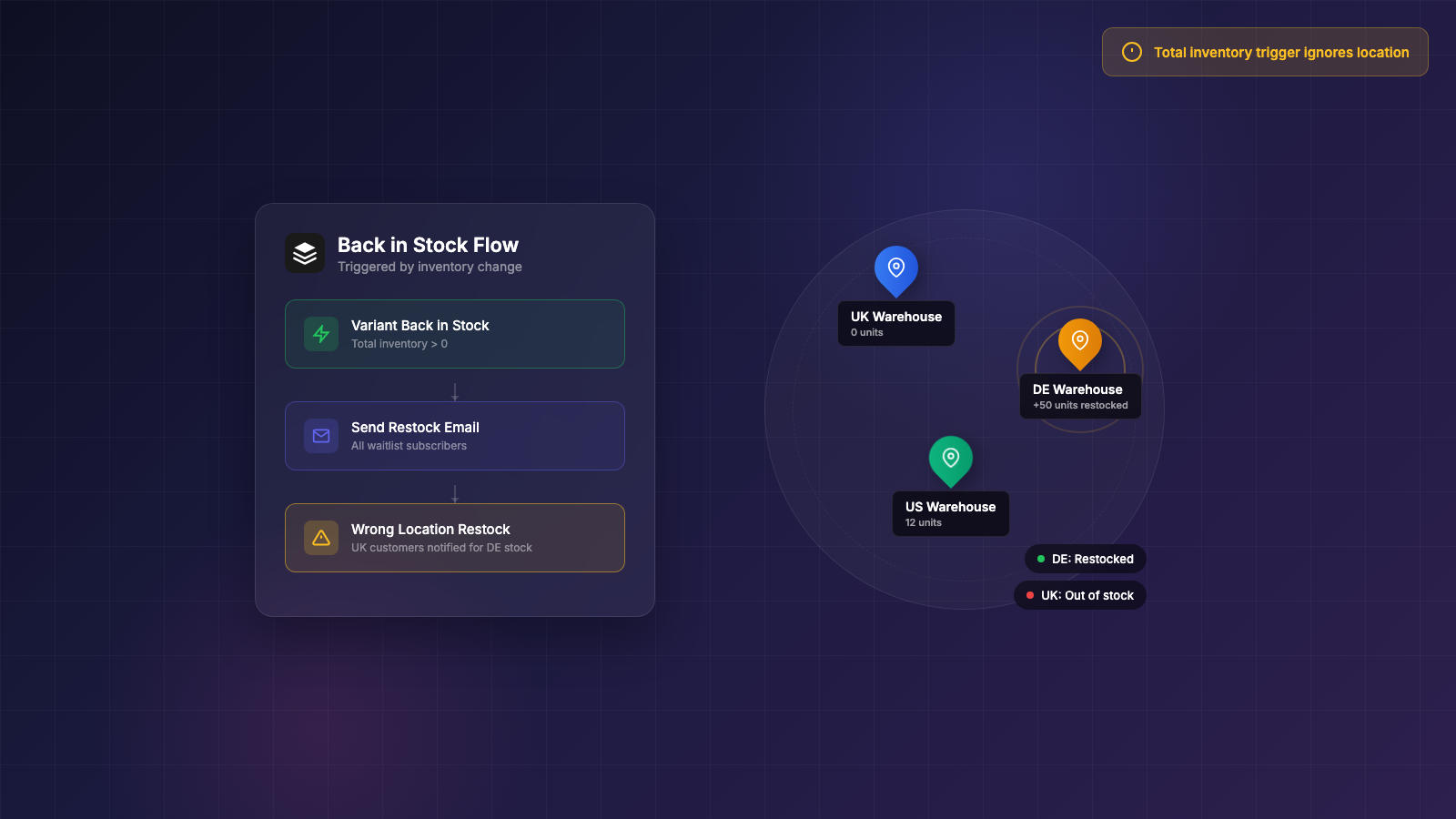
A shopper in the UK signs up for a restock alert. Your warehouse in Germany receives stock. The alert fires, the shopper clicks, and she lands on a product page with a three-week delivery estimate she cannot use.
A merchant in an r/shopify thread from June 2024 described exactly this scenario: “UK customers will get notified when your DE warehouse gets restocked… I am yet to find an app which supports this.” In August 2024, another merchant posted “Back In Stock Function - Per Market” and asked “does such a thing exist?” No one named an app. The Shopify Community thread on location-specific restock notifications has been open since 2021 and is still unsolved.
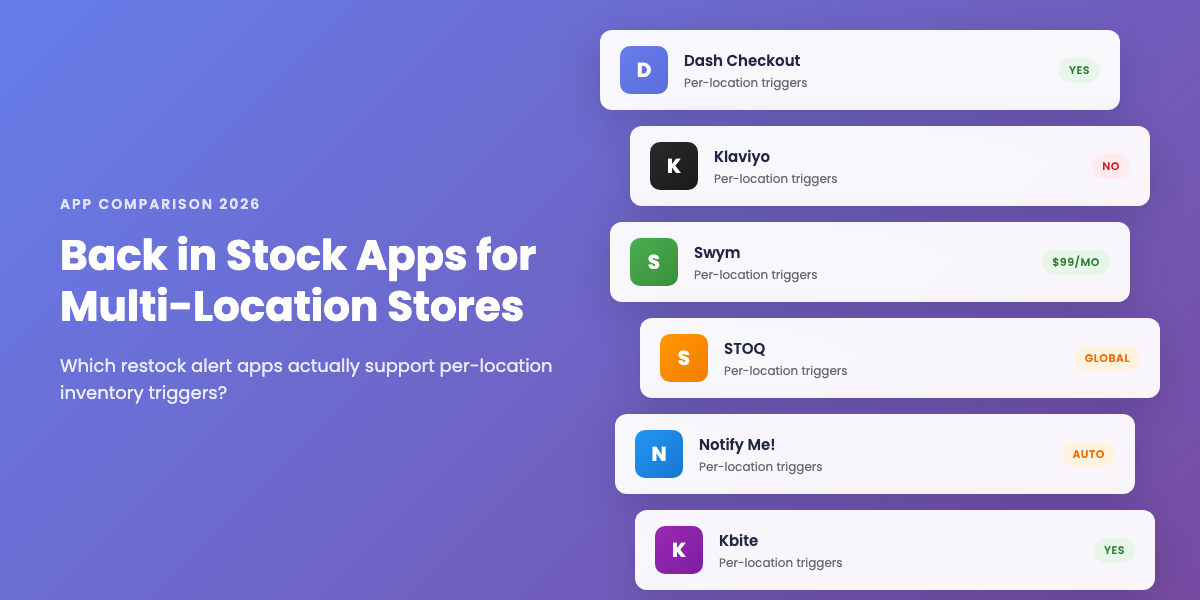
This guide compares six apps on the four things that actually break for multi-location stores: per-location triggers and whether they work per campaign, minimum-stock notify thresholds, oversold and negative-inventory handling, and which pricing tier the location feature actually lives in. Where a competitor is the better pick, we say so.
About this guide: Dash Checkout makes a Shopify checkout and back in stock app. This guide covers native options and third-party competitors, with every claim cited to a public thread, review, or help doc. No affiliate links.
Why multi-location breaks restock alerts
Before comparing apps, it helps to understand the three failure modes. They all trace back to the same underlying problem.
The webhook only sees totals. Shopify’s variants/in_stock webhook fires when a variant’s total inventory across all locations crosses from zero to positive. The payload carries no per-location data. A Shopify Community thread on this webhook documents another problem: the webhook requires every location to hit zero before it fires again, and merchants report it arriving unreliably. Any app that relies only on this signal is location-blind by definition.
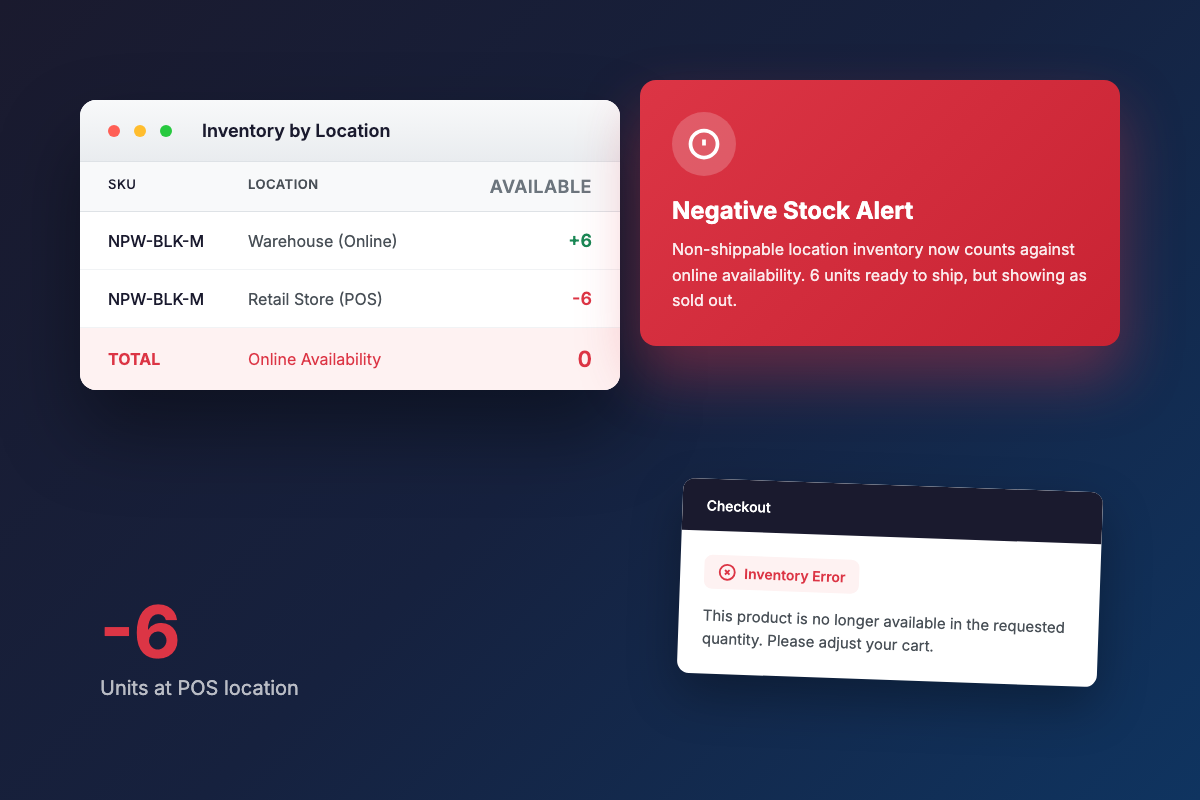
Negative inventory now affects availability. Since mid-July 2026, Shopify counts negative stock at non-shippable locations into online availability. An active r/shopify thread from July 13, 2026 captures the result: “customers can add to cart but at checkout they get an error.” An oversold POS location at -6 can cancel out 6 real units at a shipping warehouse, making a product look sold out when it is not. In August 2024, a merchant reported that this kind of availability math broke their “Notify me” plugin outright.
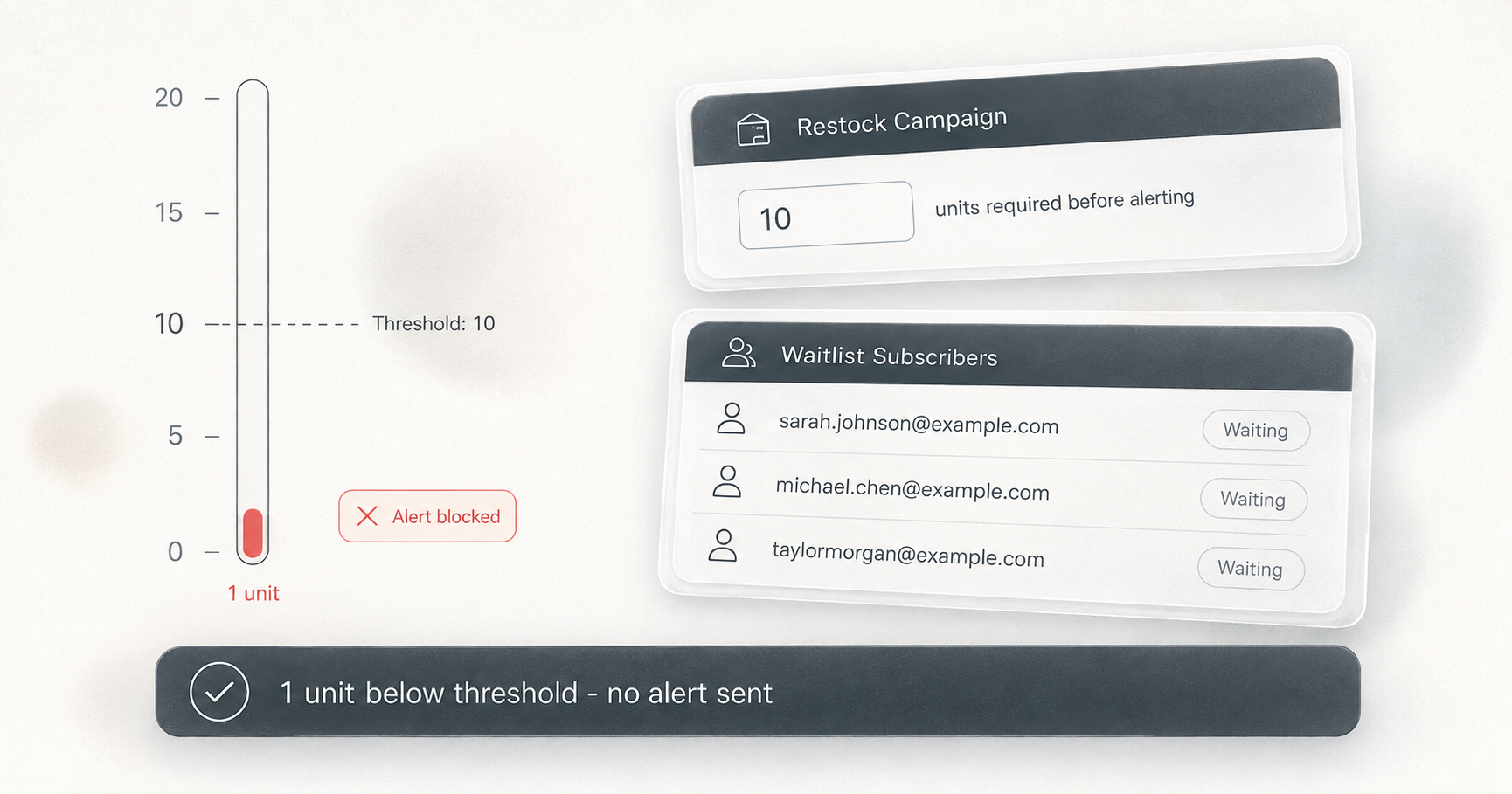
Phantom restocks blast the waitlist. One cancelled order or refund puts a unit back into inventory. The app sees zero-to-one, fires the alert, and emails the entire waiting list about stock that vanishes in minutes. A merchant in a 2022 r/shopify thread described searching for an app that “won’t message 300 people when 1 unit comes back in stock when I cancel an order.” The same question appeared in December 2024, this time about 50 subscribers being re-alerted after cancellations. A Shopify Community thread on the refund restock default has 20+ replies going back to 2021 with no resolution.
These three failure modes produce the four criteria worth checking on any app: per-location triggers with per-campaign control, minimum-stock thresholds, documented oversold handling, and at which plan level you actually get location features.
Comparison table: six apps at a glance
| App | Per-location triggers | Per-campaign? | Notify threshold | Oversold handling | Location feature tier |
|---|---|---|---|---|---|
| Dash Checkout | Yes | Yes | Yes | Documented (negatives count as zero) | See pricing page |
| Klaviyo | No | N/A | Yes | Not documented | Included in Klaviyo |
| Swym Back in Stock Alerts | Yes | Unknown | Yes | Not documented | Premium ($99.99/mo) |
| STOQ | Yes | No (global) | Yes | Not documented | Available |
| Notify Me! | Partial (auto-filter) | No | Yes | Not documented | Available |
| Kbite Back in Stock Notify | Yes | Unknown | Yes | Not documented | Cheap plans |
“Not documented” means the behavior was not found in the app’s public documentation. For oversold inventory, that is itself the finding: if an app does not document how it handles negative-inventory locations, you have no way to predict what it will do after the July 2026 Shopify change.
Dash Checkout (best for per-campaign location rules)
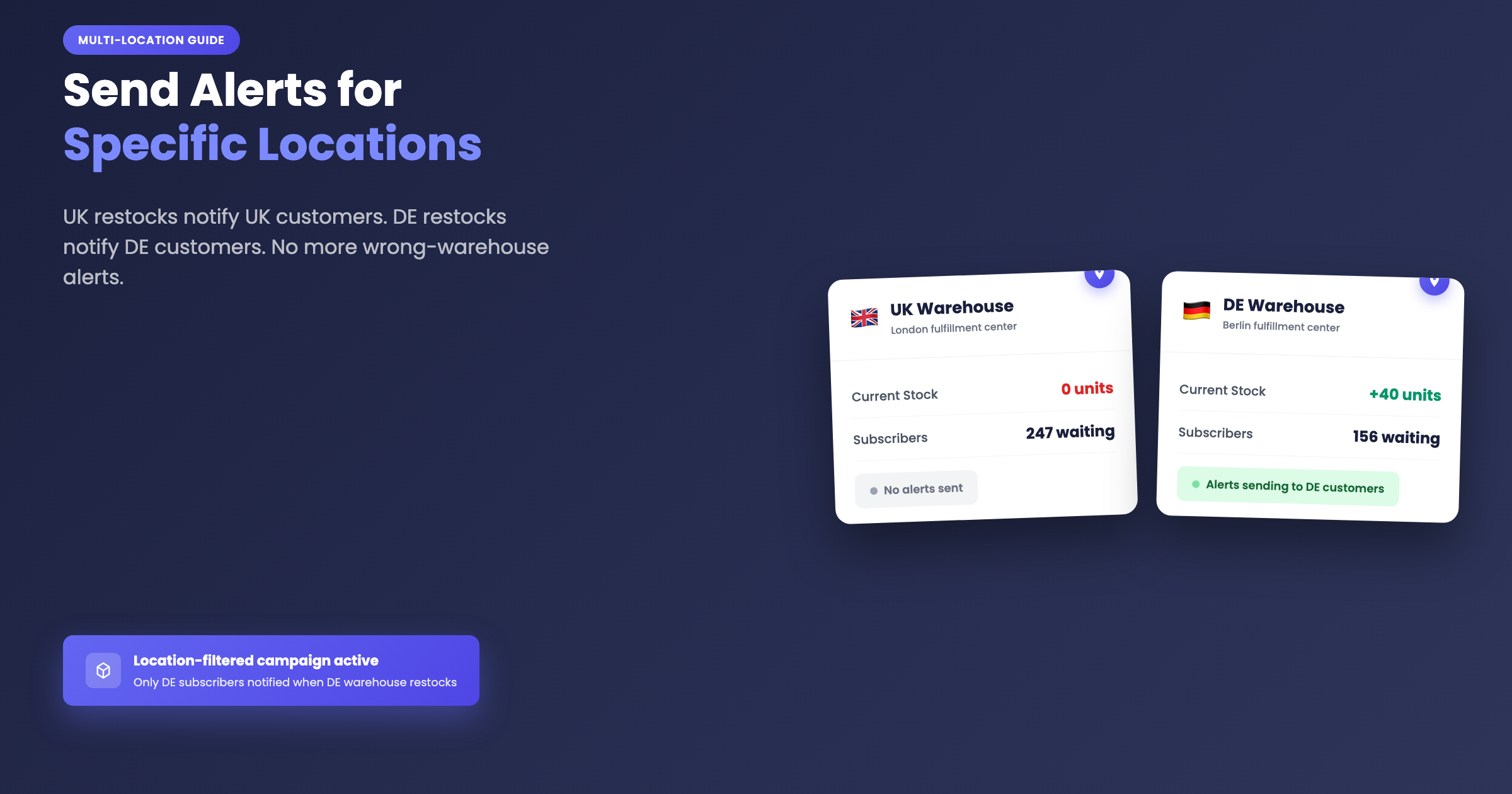
Dash organizes restock signups into campaigns. Each campaign targets products (all products, by tag, selected products, or selected variants) and includes its own “Count inventory at” checkbox list of your Shopify locations. Leave all locations unchecked and the campaign counts total inventory across every location, which is the default. Select specific locations and subscribers are only notified once the combined available stock at those locations reaches the campaign’s threshold.
That means a “UK customers” campaign can watch UK warehouses and a “US customers” campaign can watch US warehouses, on the same product, simultaneously. Signups route to exactly one campaign based on priority (0 to 5), so there is no double-alerting.
Thresholds are level-triggered. Alerts fire when current stock reaches the threshold, not merely at the restock moment. With a threshold of 3, a single returned unit sits at 1, the check runs, nothing sends, and the alert waits until stock actually reaches 3. This directly closes the cancelled-order problem from the 2022 r/shopify thread and the December 2024 follow-up.
Oversold handling is documented. When a campaign counts selected locations, oversold locations with negative available inventory count as zero in the sum. A warehouse at -6 cannot cancel out 6 real units at your selected store. Dash also treats a variant as in stock when any single location is positive, even when an oversold location drags the raw total to zero or below. This maps directly onto the July 2026 negative-stock problem.
Latency depends on the trigger path. For campaigns counting total inventory, Shopify’s zero-crossing webhook triggers alerts within seconds. Location-filtered campaigns are evaluated by a poller that runs about every 30 seconds instead, because the webhook carries no per-location data. Location alerts arrive in about 30 seconds, not instantly. The poller also catches missed webhooks and restocks that land below a threshold. Stores with more than 500 watched variants are sampled per poll pass, with full coverage within a few minutes.
The feature carries a Beta badge in the app. The per-location poll fetches up to 20 locations per variant, which is worth noting for stores with unusually large location counts.
Duplicate sends are prevented by design: a subscription is marked notified before its email is queued, and “Alert triggered” activity events are deduped to one per campaign and variant per hour. The activity feed records per-location quantities at trigger time for location-filtered campaigns, for example “12 units at 2 selected locations,” so you can see exactly why an alert fired. Emails go out in batches (default 100 per batch, up to 1,000) with a configurable gap; follow-up batches always wait at least one minute.
Channels are email and browser push. Email alerts require the Pro plan, but signups are collected on any plan and email resumes automatically after upgrading for variants still in stock. Browser push is free on every plan (shoppers accept a browser permission prompt after signing up). Restock emails ship with default copy in 137 languages and per-language merchant overrides chosen by subscriber locale. For plan details, see the pricing page.
When Dash is not the pick: you want a battle-tested, years-old tool rather than a Beta-badged one, or you have no location-specific requirements and already pay for one of the apps below. For setup details, see the Dash Back in Stock feature page.
Klaviyo (best if your email already lives there, and you have one location)
Klaviyo staff have confirmed on their own community forum that Klaviyo’s native back in stock “does not distinguish between inventory at different store locations.” The limitation is documented in two separate Klaviyo community threads going back roughly five years. The second thread shows the workarounds staff point merchants toward: inventory thresholds or building a custom API integration.
There is a second failure mode from the June 2024 r/shopify thread: a Klaviyo user in the comments described momentary restocks firing the back in stock flow and losing the waitlist queue. A single blip in inventory burns the whole list, and those subscribers are marked as notified before they ever buy.
What Klaviyo does well: thresholds exist, and the flow lives inside the email program you already use, so restock alerts inherit your templates, suppression lists, and analytics. No separate app to reconcile.
Verdict: the strongest choice if you are already deep in Klaviyo and ship from a single location, or genuinely do not care which location triggered the alert. Rule it out if per-location alerts are the reason you are reading this.
Swym Back in Stock Alerts (location control exists, on the $99.99/mo plan)
Swym has both per-location triggers and thresholds, the most complete competitor feature set on paper. The practical catch is that location control sits in the Premium plan at $99.99/mo, according to Swym’s published plan pricing.
A merchant review documents phantom alert storms: “randomly started sending out hundreds of back in stock alerts for products that were still out of stock.” Other reviews describe hours-long inventory sync lag between Shopify and Swym.
Verdict: worth shortlisting for larger stores that want Swym’s wider wishlist-plus-alerts suite from one vendor and can absorb the Premium price. Budget-sensitive multi-location stores are paying $1,200 per year for a location checkbox that is available elsewhere.
STOQ (best for one store-wide location rule)
STOQ offers both location selection and thresholds. The constraint is that its location choice is global: one set of locations applies across all products. There is no per-campaign or per-collection targeting.
The practical implication: if you sell UK-fulfilled and US-fulfilled product lines from one store, STOQ cannot watch different warehouses for different product sets. If every product you sell ships from the same subset of locations, the global setting covers everything you need.
Verdict: a solid pick for single-region multi-warehouse stores that want one location rule with minimal configuration. Skip it if different products need to point at different location sets.
Notify Me! (zero-config filtering, no control)
Per its own help documentation, Notify Me! automatically filters inventory to online-fulfillable locations only, and merchants cannot choose which locations count. The filtering is real but entirely automatic.
That auto-filter genuinely fixes the most common complaint: alerts firing on stock at non-shippable locations. For merchants who want the problem to disappear without configuration, this is a reasonable answer. What it cannot do is express “only count my two east-coast warehouses” or run any per-region campaign logic. Thresholds are supported.
Verdict: the hands-off option for stores whose only requirement is that online-sellable stock triggers alerts. Pass if you need any control over which locations count.
Kbite Back in Stock Notify (budget pick)
Kbite lists multi-location support and a minimum inventory limit on its cheaper plans, which makes it the least expensive route to both headline features in this comparison.
What could not be verified from public documentation: whether location selection is per-campaign or applies globally across all products, and how negative-inventory locations are treated. Test both behaviors on a development store before relying on Kbite for a launch.
Verdict: the budget pick when you need location awareness plus a threshold and can live with lighter documentation.
The oversold-inventory question no vendor documents
None of the five competitors in this roundup documents what happens when a location’s available inventory is negative. Given that the July 2026 Shopify change makes negative stock at non-shippable locations count against online availability, undocumented behavior here means undocumented false alerts or missed alerts.
Two behaviors any app should handle correctly: oversold locations must not subtract from real stock elsewhere (count them as zero, not as a straight net total), and a variant with positive stock at any location should still register as available. Dash documents both. Use these as questions to put to any other vendor’s support team.
For context on how widespread the underlying misfire problem is: an Appikon review on the Shopify App Store (an app we cut from the main table for having no findable location triggers) reads “misfires for us all the time.” The misfire problem shows up across vendors.
Which app fits your store
- Different location rules for different product lines or regions: Dash Checkout, with documented per-campaign location targeting.
- Already running Klaviyo email with one fulfillment location: stay in Klaviyo.
- Want wishlists and alerts from one vendor, budget for $99.99/mo: Swym Premium.
- One location rule for the whole catalog: STOQ.
- Online-fulfillable filtering with zero configuration: Notify Me!.
- Tightest budget that still needs location plus threshold: Kbite.
One piece of advice that applies regardless of which app you pick: set the notify threshold above 1 so a single cancelled order can never email your whole waitlist. A merchant in a 2022 r/shopify thread was looking for exactly this, and every app in this table supports it at some level. Also test a refund-restock on a development store before your next drop, so you see what the alert behavior looks like before your customers do.
For how Dash campaigns, thresholds, and location filters work, see the Back in Stock feature page. For plan details, including which plan includes email alerts versus which features are free on every plan, see the pricing page. If you are managing products that have not restocked yet rather than products that are sold out, the best Shopify preorder apps for 2026 covers that side of the problem.